

Therapist Appointment Scheduling Software: What to Look For
Therapist appointment scheduling software has to handle what general booking apps do not: recurring weekly sessions, telehealth and in-office visits in one calendar, intake and consent before the first session, and a cancellation policy applied the same way every time. The right system books new clients without phone tag and keeps ongoing clients in their standing slot without rebooking.
This guide explains what to look for, how therapy scheduling differs from other appointment software, and how to compare options with a checklist.
Why therapy scheduling is different
Most appointments software is built for one-off bookings: a haircut, a sales call, a consultation. A therapy practice works differently in five ways.
- Recurrence. Most clients come weekly or every other week at the same time.
- Two visit types. Clients move between telehealth and in-office sessions, sometimes week to week.
- Paperwork first. Intake, informed consent and telehealth consent should be signed before session one.
- Policy enforcement. Late cancellations and no-shows are part of the clinical frame, not just lost revenue.
- Confidentiality. Appointment details are sensitive, and reminders should not reveal more than they need to.
Therapy scheduling software that ignores these points pushes the work back onto you: rebooking weekly clients by hand, emailing forms separately and having awkward conversations about fees.
New clients: booking without phone tag
The first contact is where online client booking software pays off. A prospective client should be able to:
- See your session types, lengths and fees.
- Choose telehealth or in office.
- Pick an open time.
- Pay or hold the session with a card.
- Receive intake and consent forms immediately.
In Prexella, that is one flow on your own domain. After paying, new clients are guided into creating their portal account, where your intake and consent forms are waiting. Every booking is checked on the server before it is confirmed, so two clients cannot take the same hour, and past dates cannot be booked. The online booking page shows each step.
See it with your own practice
Prexella runs booking, superbills, the client portal and marketing in one system on your own domain. A live demo takes 30 minutes.
Ongoing clients: the standing slot
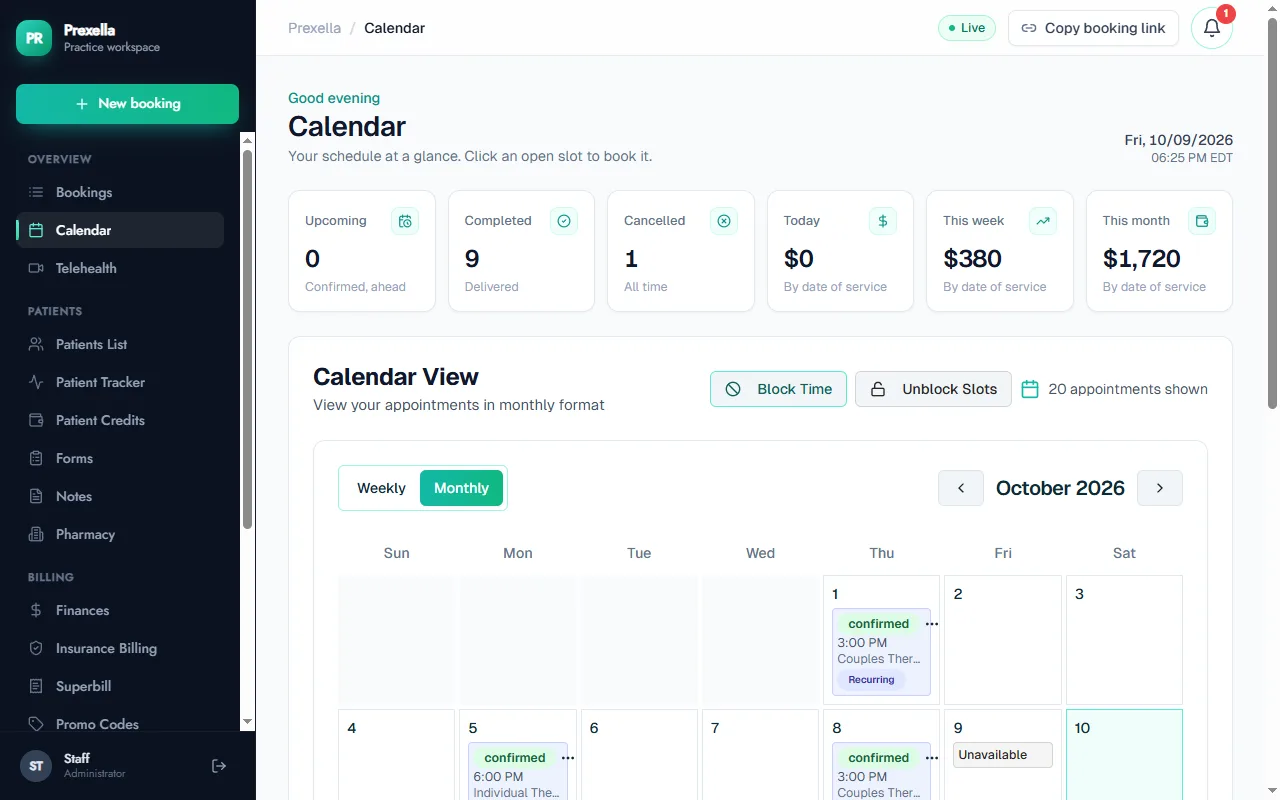
For ongoing clients, the most useful feature in any therapist appointment scheduling software is the recurring session. Put the client on Tuesdays at 4:00 p.m. and the calendar holds that slot every week, with a reminder the day before each one.
Rescheduling should be possible without a phone call, but within your rules. A client scheduling app that lets clients move sessions freely can empty your best hours; one that allows no changes creates email back-and-forth. Look for a client appointment scheduling app that lets clients reschedule in the portal while still applying your cancellation policy.
Telehealth and in-office in one calendar
Many therapists now run hybrid practices. Two calendars, one for video and one for the office, guarantee eventual double-booking. Choose an online scheduling system where telehealth is a visit type on the same calendar.
In Prexella, clients choose the visit type when they book; telehealth clients receive the join link by email, and the session runs in the HIPAA-ready video tool you already use. See telehealth for details.
The visit type also matters for billing. The Centers for Medicare & Medicaid Services defines place of service codes 10 for telehealth in the patient's home and 02 for telehealth elsewhere, alongside 11 for the office (CMS, accessed 10/10/2026). Superbills built from appointments that already record the visit type get those codes right without extra work.
Cancellations and no-shows
A cancellation policy only works if it is applied consistently. Software helps by removing discretion from the routine cases.
Prexella works with prepaid session credits. A no-show or a cancellation within 48 hours costs one credit, the same rule for every client. Clients buy session credits in the portal, and get an email when their balance is running low, so there are fewer awkward money conversations in session.
Intake and consent at booking
Starting therapy with paperwork done changes the first session. Look for client scheduling software that sends forms automatically on booking and records signatures.
Prexella's forms include a client intake form, informed consent for treatment, a privacy practices notice and telehealth consent. Each signature records the consent statement, typed name, drawn signature, timestamp, IP address and browser.
Checklist: comparing therapy scheduling software
| Requirement | Why it matters for therapists |
|---|---|
| Recurring weekly sessions | Most caseloads are standing appointments |
| Telehealth and in-office in one calendar | Prevents double-booking in hybrid practices |
| Server-side double-booking checks | Two clients cannot take the same hour |
| Online booking for new clients | Removes phone tag for intake sessions |
| Intake and consent sent on booking | First session starts with paperwork done |
| Cancellation policy enforced automatically | Consistent, less awkward |
| Prepaid sessions or packages | Fewer unpaid sessions |
| Reminders before every session | Fewer no-shows |
| Client portal in a browser | No app for clients to install |
| Your practice's name and domain | Clients see you, not a vendor |
| Business associate agreement | Required for HIPAA-covered practices |
Couples and family sessions
Couples and family therapy add a scheduling wrinkle: more than one person attends, and the session type affects fees and billing codes. Look for appointment scheduling platforms that let you define couples and family sessions as their own service types with their own lengths and prices. In Prexella, couples and family sessions are separate session types that use more credits than an individual session. The marriage and family therapists page covers those workflows.
Setting your availability
The way you open your calendar shapes your caseload. Three decisions matter most.
Which hours are bookable online. Many therapists open only intake slots to new clients online and keep their prime evening hours for ongoing clients. A client booking software that lets you open specific slots, rather than whole days, makes that easy.
How far ahead clients can book. Weekly clients need to see their regular slot weeks ahead; new clients rarely need more than two or three weeks.
Buffers. A ten-minute gap between sessions for notes and a breath is worth more than one extra session a day.
In Prexella, the calendar holds recurring slots for ongoing clients, you can block time or open slots from the calendar, and the booking page only shows what is open.
Group therapy
Group sessions bring several clients into one slot. If you run groups, check whether your customer scheduling software can book several clients into one session and bill each at the group rate. Prexella suggests CPT code 90853 for sessions named as groups on superbills; booking several clients into one shared group slot is something to test in a demo before you rely on it.
Moving clients from another system
Switching appointment scheduling platforms mid-caseload is the part therapists dread. It is manageable if you do it in order:
- Set up your services, availability, policies and forms in the new system.
- Send new clients to the new booking page from day one.
- As each ongoing client's next session comes up, book it in the new system and invite them to the portal.
- Keep the old system until its calendar is empty, then export and close it.
Most practices complete the move within one billing cycle.
Guardrails for self-scheduling
Self-scheduling is convenient, but therapists usually want limits. Before opening an online appointment scheduling system to clients, decide:
- Who can book what. New clients should see only intake appointments; ongoing clients see their usual session type.
- How close to the session clients can book or cancel. Same-day bookings may not suit your practice.
- Whether clients can change visit type. Switching from in office to telehealth may need your approval.
- Which slots are self-bookable. Keep some hours for clients you place yourself.
A schedule an appointment app that cannot enforce these limits will create more work than it saves. Ask each vendor to show the rules in a live demo.
Reminders that respect confidentiality
Reminders reduce no-shows, but in therapy they also carry a privacy risk: a reminder that names the service can reveal that someone is in therapy to whoever sees their phone. Good therapy scheduling software lets the reminder say only what is needed: the practice name, the date and time, and, for telehealth, the link.
Ask every vendor to show you the exact text of a reminder email and a confirmation email. If it includes the session type or diagnosis-related wording, check whether you can change it.
Waitlists and filling cancellations
A late cancellation leaves an hour you could have filled. Many therapists keep an informal waitlist of clients who want an earlier slot or a second session that week. Software helps when a cancelled slot reappears on your booking page immediately, so a client checking the portal can take it, and when you can see at a glance which waitlisted clients prefer that day and time.
Be careful with automatic waitlist texts in therapy. A message offering "an opening with your therapist today" is convenient, but it also tells anyone who sees the phone that the person is in therapy. Keep offers short and neutral, or make them in the portal.
Measuring no-shows
You cannot improve what you do not count. Track no-shows and late cancellations per month for three months before and after you change systems. Most practices see the biggest drop from three changes together: payment or prepaid credits at booking, a reminder the day before, and a cancellation policy shown at booking and applied consistently. If your no-show rate does not move, look first at whether reminders are being delivered and whether the policy is visible before clients confirm.
Common scheduling mistakes in therapy practices
Using the wrong place-of-service code for telehealth. Superbills and claims for video sessions need the code that matches where the client was. The Centers for Medicare & Medicaid Services defines POS 10 for telehealth received in the client's home and POS 02 for telehealth received somewhere else (CMS, accessed 10/10/2026). A scheduler that records the visit type at booking lets the superbill carry the right code; Prexella uses the practice's default telehealth code for virtual sessions and 11 for office sessions.
Booking telehealth clients who are traveling. Licensure generally follows where the client is during the session, not where the therapist is. A client who books their usual video slot from another state may be outside your license. The APA's telepsychology guidelines ask psychologists to know the laws and regulations of the jurisdictions where they and their clients are located. Confirm the client's location at the start of each telehealth session.
Letting the policy drift. Waiving the late-cancellation fee for one client and charging the next undermines the policy for everyone. Configure the rule once and let the software apply it.
Professional guidance on technology
Professional bodies expect clinicians to understand the tools they use. The American Psychological Association's guidelines for the practice of telepsychology cover informed consent, confidentiality and security when technology is part of care, and are a useful lens for choosing any schedule-an-appointment app that will hold client information.
Choosing therapist appointment scheduling software for your caseload
There is no single best scheduling system; there is the one that fits your caseload. Solo therapists with mostly weekly clients should weight recurring sessions, reminders and the cancellation policy. Group practices should weight multiple calendars and pricing per clinician. Hybrid practices should weight telehealth handling.
For the full picture of practice software for therapists, see therapists. To see Prexella's scheduling with your own session types and policies, request a demo.
Bottom line
Choose therapist appointment scheduling software that understands recurring sessions, hybrid visit types, intake at booking and consistent cancellation rules. A general booking app gets you the first appointment; therapy scheduling software keeps the next fifty running without you managing each one.
Run your practice from one screen
Booking, superbills, the client portal and marketing on your own domain. See it in a free, one-on-one demo.