

Client Management Software for Small Practices: What It Should Do
Client management software gives a small practice one record per client, connecting booking, payments, forms, messages and follow-up so nothing lives in five places. For most solo and small-group practices, the right system is the one that removes double entry and gets clients booked, paid and paperwork-complete without you chasing them.
This guide covers what client management software should do for a practice that sells sessions, how it differs from a sales CRM, the features worth paying for, and a checklist you can use to compare tools.
What client management software actually does
At its simplest, client management software stores who your clients are. The useful versions do far more, because a client in a service practice is not a static contact. They book, pay, sign forms, reschedule, message you and, ideally, come back.
A good client management system ties those events to one record:
- Identity and contact details: name, email, phone, date of birth and address, entered once by the client.
- Appointments: past and upcoming sessions, visit type and status.
- Money: what was charged, what was paid, prepaid balances and refunds.
- Documents: intake forms, consents and policies, with signatures.
- Communication: messages, reminders and any newsletters the client receives.
- Notes and history: what you need to know before the next session.
When those pieces live in separate tools, every new client means typing the same details into a scheduler, a payment app and a forms service. When they live in one system, the booking creates the record and everything else attaches to it.
How it differs from a sales CRM
People searching for customer management software often land on sales CRMs. Those tools are built to move a lead through a pipeline: first contact, demo, proposal, closed deal. They are strong at tracking prospects and weak at what happens after someone becomes a paying client.
A practice needs the opposite emphasis. Most of the work starts after the first booking: forms before the first session, reminders before every session, payments, prepaid packages, and records you must keep. A sales CRM can sit alongside your practice software for lead tracking, but it rarely replaces it.
That is also why a "CRM for therapists" usually means practice software with client communication built in, not a generic sales pipeline.
See it with your own practice
Prexella runs booking, superbills, the client portal and marketing in one system on your own domain. A live demo takes 30 minutes.
Features worth paying for
The best client management software for a small practice is not the one with the longest feature list. It is the one that covers the work you do every week without add-ons. These are the features that save the most time.
Self-booking that creates the client record
When a client books online, the system should create their record from the booking, take payment and block the slot so nobody else can take it. In Prexella, online booking checks every slot on the server before confirming it, blocks past dates, and asks how the client heard about you, which is saved with the booking.
A client portal instead of an app
Clients rarely want to install something to see a therapist or a coach. A browser-based portal does the same job. Prexella's client portal lets clients see upcoming and past sessions, book and reschedule, sign forms, message you, buy session credits and complete check-ins, all in a phone or computer browser. Portal sessions sign out after 10 minutes of inactivity, with a warning first.
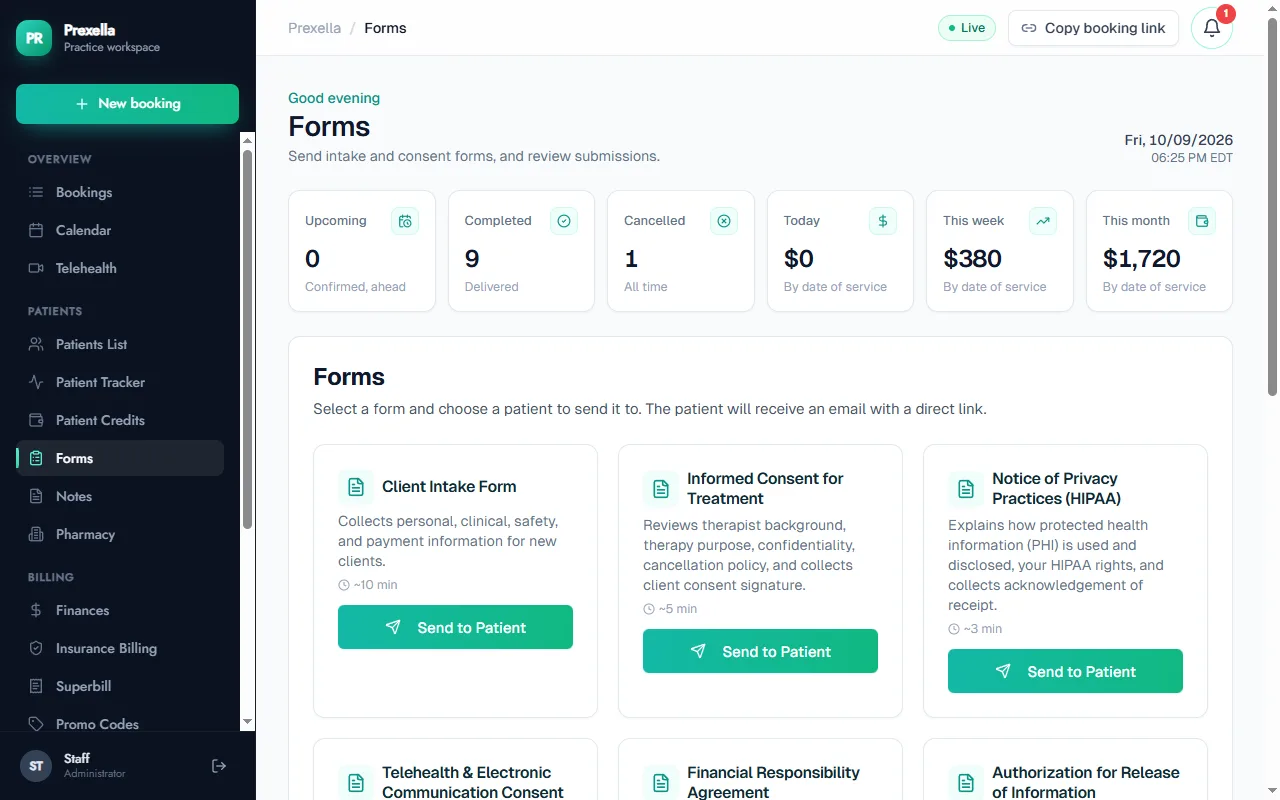
Forms and e-signatures
Intake forms, informed consent, telehealth consent and privacy notices should be sent from the client record and come back signed, with a record of who signed and when. Prexella's e-signatures store the consent statement, typed name, drawn signature, timestamp, IP address and browser for each signed form.
Prepaid packages and credits
Chasing unpaid sessions is the most common admin complaint in small practices. Prepaid sessions remove most of it. In Prexella, clients buy session credits in the portal, each completed session uses credits, and the system emails clients when their balance is running low.
Follow-up and marketing
Client management does not stop when a session ends. Newsletters, reactivation emails and knowing where new clients come from all depend on the same client list. Prexella's marketing suite keeps the ad results you record for Meta and Google, video scripts and client newsletters in the same dashboard as your calendar.
A checklist for comparing tools
Use this checklist when you compare tools. Score each item yes, partly or no for every option on your shortlist.
| Question | Why it matters |
|---|---|
| Does online booking create the client record automatically? | Removes double entry for every new client |
| Can clients pay at booking, including prepaid packages? | Cuts unpaid sessions and invoice chasing |
| Are forms sent and signed from the client record? | Keeps consent and intake attached to the right person |
| Is there a client portal that works in a browser? | Clients avoid installing a client management app |
| Are reminders automatic? | Reduces no-shows without manual texts |
| Does the price rise per staff member? | Decides what growth costs you |
| Can it carry your brand and domain? | Clients see your practice, not a vendor |
| Can you export your data? | Protects you if you switch later |
| Does the vendor sign a business associate agreement if you handle health information? | Required for HIPAA-covered practices |
If you handle protected health information, read the U.S. Department of Health and Human Services guidance on business associates before choosing any vendor that will store client records.
General business tools vs practice tools
General client management software for small business is built for agencies, consultants and contractors: projects, invoices and email threads. A therapy, counseling or coaching practice has different needs:
- Sessions, not projects. The unit of work is a scheduled session with a visit type, often recurring weekly.
- Consent and confidentiality. Forms must be signed before the first session, and records may be subject to privacy rules.
- Prepaid and package billing. Clients often buy blocks of sessions rather than pay invoices.
- Insurance paperwork. Clients who claim out-of-network benefits need superbills with CPT and diagnosis codes.
That is why counselors and coaches usually get more from practice software with client management built in than from a general business tool. The pages for counselors and life coaches show how Prexella handles each of those workflows.
Who needs it most
The pressure to adopt a proper system grows with headcount. The U.S. Bureau of Labor Statistics counted about 533,400 jobs for substance abuse, behavioral disorder and mental health counselors in 2025 and projects 18% growth from 2025 to 2035 (BLS Occupational Outlook Handbook, accessed 10/10/2026). Many of those counselors work in or open small practices, where every added clinician multiplies the cost of manual admin.
Three signs you have outgrown a calendar and spreadsheet:
- You type the same client details into more than one tool.
- You spend time each week chasing payments or unsigned forms.
- You cannot quickly answer "how many active clients do we have, and how many have prepaid sessions left?"
How Prexella handles client management
Prexella is practice management software for private-pay therapists, counselors and coaches, with client management at its center. Each client's record holds their bookings, payments, credit balance, signed forms, messages, screenings and notes. Booking, the portal and every email run on your own domain with your practice name, so clients see your brand rather than a vendor's.
What it does not do: Prexella is not a sales pipeline CRM. It does not score leads or manage deal stages; the focus is on clients who have booked.
If you are weighing options, compare the full checklist above against two or three tools, then see Prexella with your own services set up in a free demo.
Frequently overlooked costs
The price on a pricing page is rarely the full cost. Before you choose, add up:
- Per-seat fees for each clinician or staff member.
- Add-ons such as text reminders, telehealth, e-prescribing or AI notes.
- Payment processing on every card transaction.
- Setup time: who configures services, forms and branding, and how long it takes.
- Switching cost: whether you can export records if you leave.
A flat-priced system can cost more than a per-seat one for a solo practitioner and less for a practice with three or more clinicians. Run the numbers for the size you expect to be in a year, not the size you are today.
Moving your client list into a new system
Switching is where many practices stall, so plan it before you choose. A clean move takes four steps.
- Export everything your current tools allow. Calendars, payment apps and form services usually export to CSV or PDF. Keep the exports for your records, whatever you decide next.
- Start new clients in the new system first. Every new booking goes through the new client management system from day one, so its records are complete from the start.
- Move active clients as their next session is booked. Send each one a portal invitation with their next appointment, rather than importing a list of people who may never return.
- Retire the old tools after one billing cycle, once final payments and receipts are out.
Practices that try to migrate every historical record on day one usually spend weeks on cleanup. Practices that start fresh with active clients are running in days.
How to tell whether it is working
Within a month of switching, you should be able to see the difference in a few numbers:
- Hours per week on admin. Track it for two weeks before and after. Typing client details, chasing forms and sending reminders should drop sharply.
- Unsigned forms at the first session. With forms sent on booking, this should be close to zero.
- Unpaid sessions. With payment at booking or prepaid credits, outstanding balances shrink.
- No-shows. Automatic reminders before every session usually reduce them.
- Time to answer a simple question, such as "who has fewer than two prepaid sessions left?" With one client record, that answer should take seconds.
If those numbers do not move, the system is not being used the way it was set up, or it was set up around the old workflow. Revisit the booking flow first, because everything else depends on it.
A note on client experience
Clients judge your practice by every message and screen they see, not just the session. A booking page that looks like your website, a portal on your own domain, confirmations that use your practice name and a sign-in that does not ask them to learn a vendor's brand all make a small practice feel established. When you compare tools, book an appointment as a client would, on your phone, before you sign anything.
Bottom line
Choose client management software that starts from the booking and keeps every client event on one record: payment, forms, reminders, credits and follow-up. For a small practice, that matters more than any single feature. Compare tools against the checklist, price them at your next-year headcount, and favor the one your clients will find easiest to use.
Run your practice from one screen
Booking, superbills, the client portal and marketing on your own domain. See it in a free, one-on-one demo.