

Features
Superbill Software for Therapists: One Click From the Calendar
Prexella is superbill software for therapists that builds an insurance-ready PDF from a client's completed sessions in one click, with CPT, ICD-10, NPI and EIN already filled in.
- CPT, ICD-10, NPI and EIN on every PDF
- Built from completed sessions
- Place-of-service set from the visit type
Last updated 10/10/2026
The problem: superbills formatted by hand
Clients who pay privately often want to claim part of the fee back from their insurer as an out-of-network benefit. To do that they need a superbill, and the work of making one usually lands on the therapist at the end of the month: copying session dates out of the calendar, looking up the right CPT code for each session length, typing the NPI and tax ID, adding the diagnosis, and adding up what was paid.
It is unbilled time, and mistakes are expensive for the client. A superbill without an NPI, a tax ID or a diagnosis code is a common reason an insurer rejects the claim, and the client comes back to you to fix it. Some clients quietly switch to an in-network provider instead.
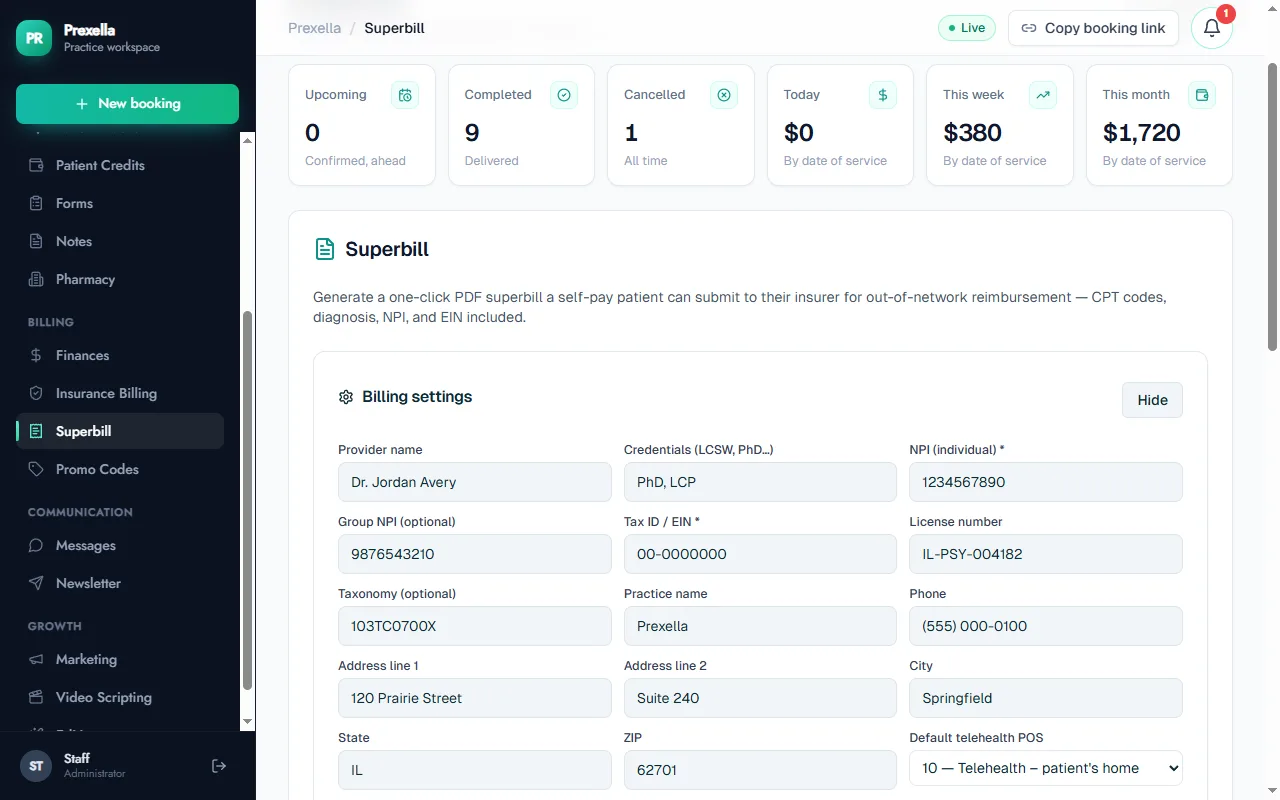
Prexella's fix is one-click superbills with CPT, ICD-10, NPI and EIN on an insurance-ready PDF, built from the sessions already in your calendar.
How Prexella's superbill software for therapists works
You enter your billing details once, then each superbill takes three steps.
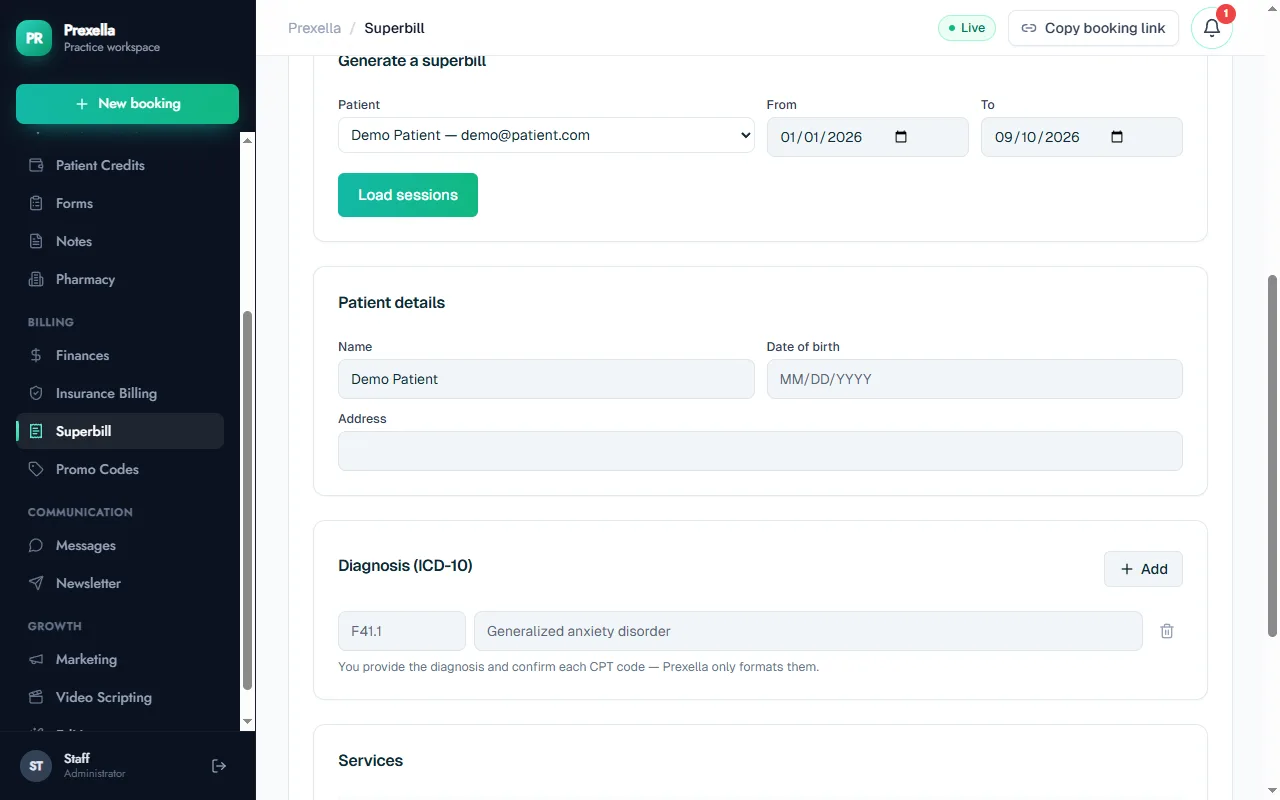
- Choose the client and date range. A single session, a month, or a quarter.
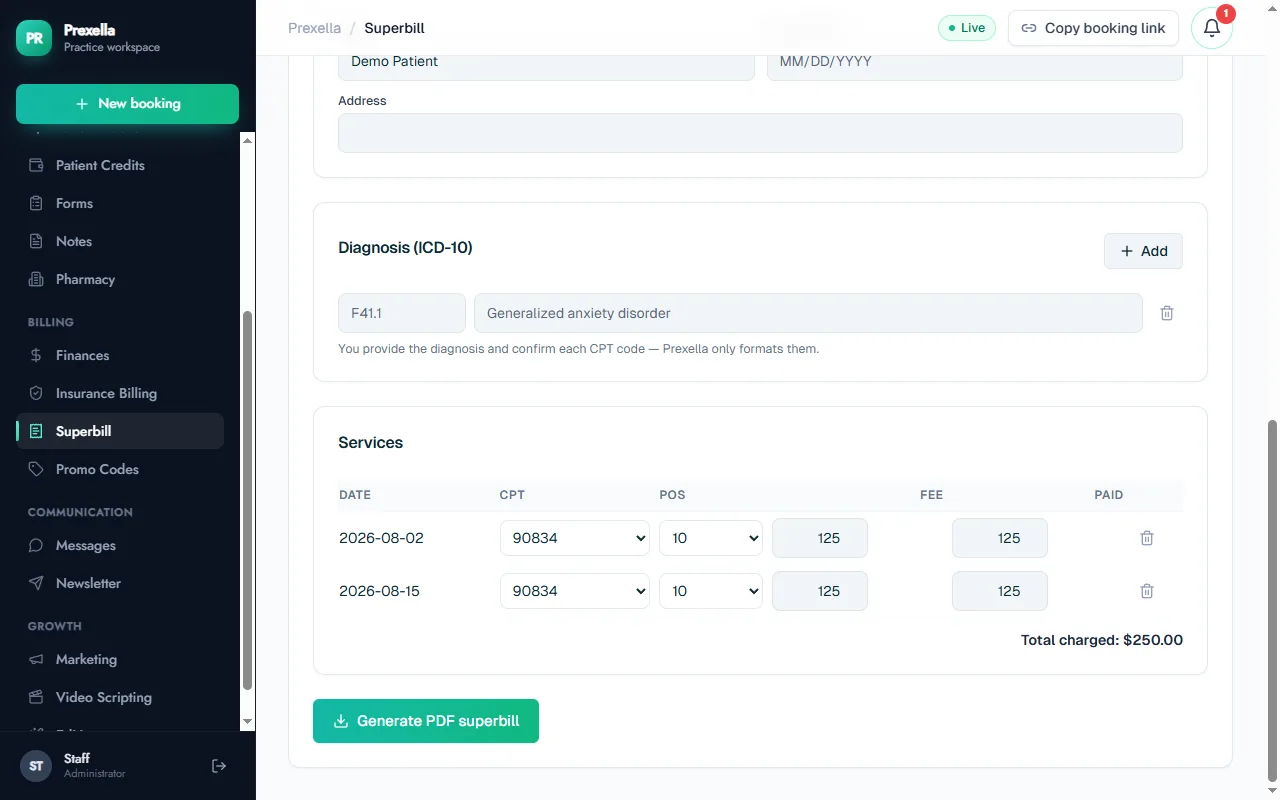
- Review the lines. Prexella pulls the client's completed sessions in that range. Each becomes a service line with the date, a suggested CPT code based on the session's length and type, the place-of-service code and the fee. Add or confirm the ICD-10 diagnosis codes.
- Generate the PDF. Download it and share it with the client to submit to their insurer.
What goes on every Prexella superbill
Prexella fills each section from your billing settings and the client's sessions:
| Section | What it includes |
|---|---|
| Provider | Practice name, provider name and credentials, address, phone |
| Identifiers | NPI (individual and group), tax ID / EIN, license number, taxonomy code |
| Client | Name, date of birth, address, email |
| Diagnosis | ICD-10 codes with descriptions |
| Services | Date of service, CPT code, description, place of service, units |
| Totals | Fee and amount paid per line, total charges, total paid and balance due |
Each PDF ends with a provider signature line and a place-of-service legend, so a claims processor can read it without calling your office. Dates print as MM/DD/YYYY.
CPT codes and place-of-service codes
The CPT code is suggested from the session: an intake becomes 90791, a group session 90853, a couples or family session 90847, and an individual session 90832, 90834 or 90837 depending on its length. The full list you can choose from on any line:
- Psychotherapy: 90791, 90832, 90834, 90837, 90846, 90847, 90853
- Psychological testing: 96130, 96131, 96136, 96137, 96138, 96139
- Medical nutrition therapy: 97802, 97803, 97804
Place of service follows the visit type the client chose when they booked: 11 for the office, and for telehealth your default of 10 (the client's home) or 02 (somewhere other than home). Code 12 (home visit) is also available. If you are unsure which code fits a session, the therapy CPT code reference explains each one, and how to create a superbill walks through the fields insurers check.
Why it matters for a private-pay practice
A superbill is often what makes private-pay therapy affordable for a client, because part of each session comes back to them. Making it quick to produce keeps clients who might otherwise move to an in-network provider, without you joining insurance panels. Paired with prepaid session credits, it lets clients pay ahead and still claim their benefits. If you also take insurance directly, the insurance billing workspace turns sessions into claims for an in-house or outsourced biller.
Who it is for
Superbills are used most by practices where clients pay up front and claim out-of-network:
- Therapists in private-pay practice who bill 90834 and 90837 every week.
- Psychologists who also bill psychological testing codes.
- Counselors whose clients have out-of-network mental health benefits.
- Clinical social workers running a private-pay caseload.
To see a superbill generated from your own session types, request a demo. If you are comparing systems, superbills are one of the rows in SimplePractice alternatives.
Frequently asked questions
What is a superbill?
A superbill is an itemized receipt a client submits to their insurer to claim out-of-network reimbursement. It lists the provider's identifiers, the client's details, diagnosis codes, each date of service with its CPT code and place of service, and what was paid.
Does Prexella choose the diagnosis code?
No. You enter the ICD-10 diagnosis and confirm every CPT code. Prexella suggests a CPT code from each session's length and type and formats everything on the PDF; the clinical and coding decisions stay with you.
Which CPT codes are supported?
The psychotherapy codes 90791, 90832, 90834, 90837, 90846, 90847 and 90853, the psychological testing codes 96130, 96131 and 96136 to 96139, and the medical nutrition therapy codes 97802, 97803 and 97804. Each line has its own place-of-service code and units.
How does Prexella handle telehealth sessions on a superbill?
The place-of-service code is set from the visit type the client chose when booking: 11 for an office visit, and your default telehealth code, 10 for the client's home or 02 for another location, for virtual sessions. You can change it on any line.
Can I make one superbill for a whole month?
Yes. Pick the client and any date range, such as a month or a quarter, and every completed session in that range becomes a line on the same PDF, with totals for charges, payments and balance due.
See Prexella with your own workflow
A live, one-on-one walkthrough of scheduling, superbills, the client portal and marketing tools. Free, no obligation.