

How to Create a Superbill for Therapy Clients, With a Free Template
A complete superbill is the difference between a client getting reimbursed in two weeks and a claim bouncing back for a missing NPI.
To create a superbill, list your provider details (name, credentials, NPI, tax ID and address), the client's name and date of birth, each date of service with its CPT code, place of service and fee, the ICD-10 diagnosis, and what the client paid. Sign it, date it and give it to the client to submit to their insurer as an out-of-network claim.
That is the short version of how to create a superbill. The rest of this guide covers each field, the codes therapists use most, the mistakes that get superbills rejected, and how to stop building them by hand.
What a superbill is, and why private-pay clients ask for one
A superbill is an itemized statement of services that a client submits to their own health plan to claim out-of-network benefits. You are paid in full at the time of service; the client then asks their insurer to reimburse part of what they paid.
This matters more in mental health than almost anywhere else in medicine. In an analysis of commercial claims, Milliman found that behavioral health office visits were 5.4 times as likely to be out-of-network as medical and surgical office visits in 2017, and that primary care office visits were reimbursed on average 23.8% higher than behavioral health visits (Milliman report via The Kennedy Forum, November 20, 2019; Milliman). Many therapists stay out of network as a result, and a superbill is how their clients recover some of the cost.
A superbill is not a claim form. You are not submitting anything to the insurer; the client is. That keeps you out of payer contracts, but it also means the document has to be complete enough that a claims processor can work from it without calling you.
How to create a superbill, step by step
Step 1: Your practice and provider details
Put these at the top:
- Practice name, address and phone number
- Rendering provider's full name and credentials (for example, LCSW, LMHC, PhD)
- Individual NPI (Type 1) for the clinician who delivered the service
- Group NPI (Type 2), if the practice has one
- Tax ID: your EIN, or your SSN if you bill as a sole proprietor without an EIN
- License number and state, and your taxonomy code if you know it
Step 2: The client's details
- Full legal name, exactly as it appears on their insurance card
- Date of birth
- Address
- Optionally, the client's insurance member ID, if they want it pre-filled
Step 3: Diagnosis
List the ICD-10-CM code and description for the condition you are treating, such as F41.1 (generalized anxiety disorder). If you treat more than one diagnosis, list the primary one first. You choose the diagnosis; it comes from your clinical assessment, not from the billing form.
Step 4: Services
Each date of service goes on its own line with:
- Date of service in MM/DD/YYYY format
- CPT code and a short description
- Place of service code
- Units (usually 1 for a psychotherapy session)
- Fee charged and amount paid
Step 5: Totals and signature
Add total charges, total paid and any balance due. Finish with a signature line for the provider and the date. Some insurers also want a statement that the amounts shown were paid in full.
Step 6: Deliver it securely
The superbill contains diagnosis information, so send it through a secure channel, such as a client portal download, rather than as a plain email attachment.
Free superbill generator
Fill in your provider and session details and download a clean superbill PDF. It runs in your browser; no client data is sent to us.
See it with your own practice
Prexella runs booking, superbills, the client portal and marketing in one system on your own domain. A live demo takes 30 minutes.
Superbill checklist
Use this before you send any superbill:
| Field | Required | Common mistake |
|---|---|---|
| Provider name and credentials | Yes | Credentials missing |
| Individual NPI | Yes | Group NPI only |
| Tax ID or EIN | Yes | Left blank on solo practices |
| Practice address and phone | Yes | P.O. box only |
| Client name and date of birth | Yes | Name does not match insurance card |
| ICD-10 diagnosis code | Yes | Description without a code |
| Date of each service | Yes | One date range instead of individual dates |
| CPT code per line | Yes | Code does not match session length |
| Place of service code | Yes | Telehealth sessions coded as office |
| Fee and amount paid | Yes | Package price not split per session |
| Provider signature and date | Usually | Unsigned PDF |
The CPT codes therapists use most
Psychotherapy codes are time-based. The American Psychiatric Association's CPT overview explains that because the codes describe a specific time, the CPT time rule applies; for example, 90832 covers 16 to 37 minutes of psychotherapy (American Psychiatric Association CPT overview).
| CPT code | Description | Typical use |
|---|---|---|
| 90791 | Psychiatric diagnostic evaluation | Intake session |
| 90832 | Psychotherapy, 30 minutes (16–37 min) | Short session |
| 90834 | Psychotherapy, 45 minutes (38–52 min) | Standard session |
| 90837 | Psychotherapy, 60 minutes (53+ min) | Long session |
| 90846 | Family psychotherapy without the client | Parent or family session |
| 90847 | Family psychotherapy with the client | Couples or family session |
| 90853 | Group psychotherapy | Group session |
Psychologists who bill testing use 96130 through 96139, and dietitians bill medical nutrition therapy with 97802 through 97804. Those are reported in units, so list each unit or hour as the code requires.
Place of service codes for telehealth and office sessions
The place of service (POS) code tells the insurer where the session happened. CMS defines POS 02 as "Telehealth Provided Other than in Patient's Home," POS 10 as "Telehealth Provided in Patient's Home" (effective January 1, 2022), and POS 11 as "Office" (CMS place of service code set, checked 10/10/2026).
For a client joining a video session from their living room, that usually means POS 10. Some commercial plans still ask for POS 02 for all telehealth, so check the plan's policy if a client's claim comes back.
Why superbills get rejected
Most rejected superbills fail for one of five reasons:
- No individual NPI. A group NPI alone often is not enough.
- Mismatched names. "Jen Smith" on the superbill and "Jennifer A. Smith" on the insurance card can stall a claim.
- Date ranges. "Sessions 03/01–03/31" instead of one line per date of service.
- Wrong time code. A 50-minute session billed as 90837 instead of 90834.
- Telehealth coded as office. POS 11 for a session that happened over video.
The client then has to come back to you, you have to reissue the document, and a reimbursement that should have taken weeks takes months.
Building superbills by hand vs. generating them
A spreadsheet or word-processor template works for five clients. At 25 clients it becomes a monthly afternoon of copying dates out of your calendar, looking up codes and exporting PDFs.
| Hand-built template | Generated from your calendar | |
|---|---|---|
| Time per superbill | Several minutes of copying | Under a minute |
| Dates of service | Copied manually | Pulled from completed sessions |
| CPT code | Looked up each time | Suggested from session length |
| Provider details | Retyped or pasted | Stored once in settings |
| Telehealth POS | Easy to forget | Set from the visit type |
| Error risk | High | Low |
This is one of the jobs general-purpose medical practice management software and doctor practice management software handle through insurance claims, and it is why private-pay therapists look for therapist practice management software that treats superbills as a first-class feature instead. Clinic management software built for in-network medical billing often buries superbills under claims workflows, while therapy practice management software built for private pay puts them one click from the calendar.
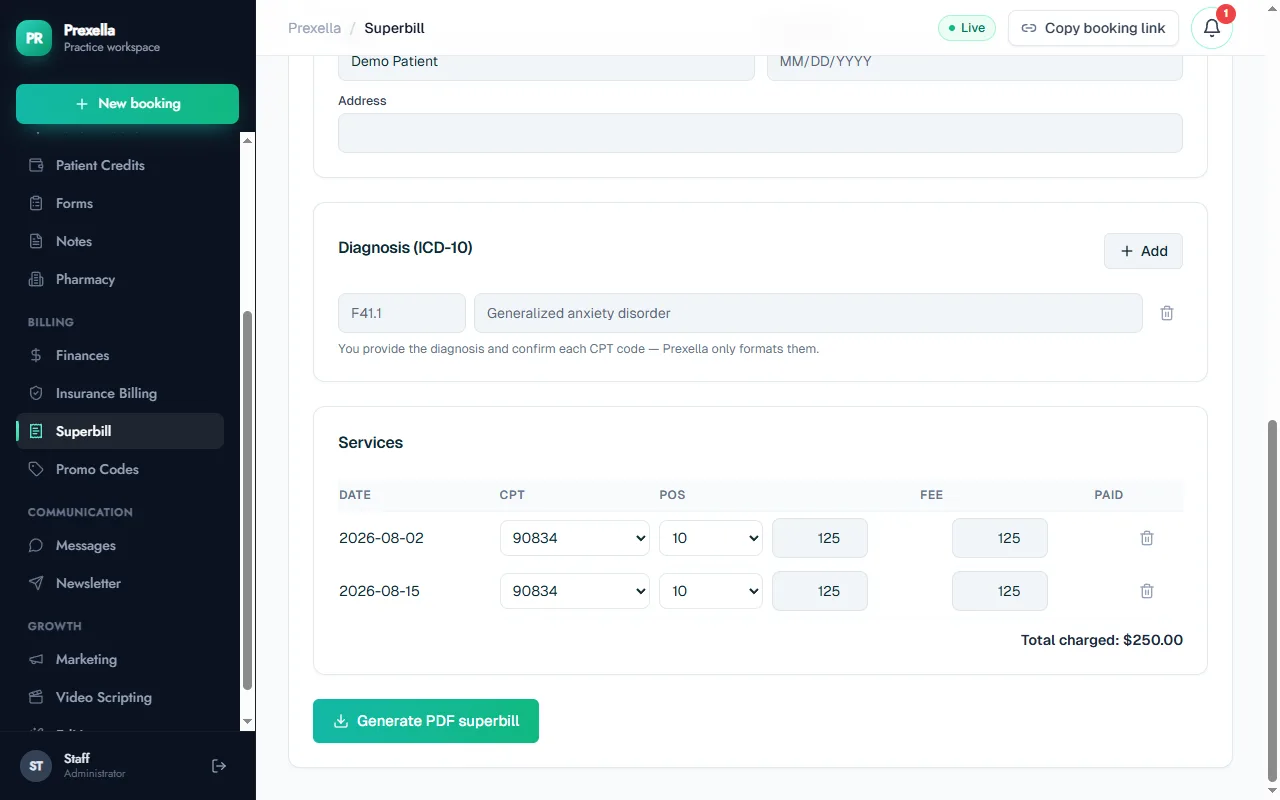
In Prexella's superbill feature, you choose the client and date range, it pulls their completed sessions, suggests the CPT code from each session's length, applies the telehealth or office place of service from the visit type, and fills in your NPI, EIN, license number and taxonomy from your billing settings. You add or confirm the ICD-10 code and download the PDF. The same records sit in its patient management software views, so the superbill always matches the calendar.
Healthcare practice management software varies widely in how it handles this. If superbills are a big part of your month, ask any vendor to generate one live on a demo call.
Superbill vs. CMS-1500 claim form
Therapists who move between in-network and out-of-network work often ask whether they should hand clients a CMS-1500 instead of a superbill. The CMS-1500 is the standard paper claim form for professional services, and in-network providers submit claims on it (or its electronic equivalent) directly to the payer. A superbill carries much of the same information but is addressed to the client, who submits it.
| Superbill | CMS-1500 claim | |
|---|---|---|
| Who submits | The client | The provider or biller |
| Format | Your own layout | Standardized form |
| Contract with payer | Not required | Usually in-network |
| Payment goes to | The client | The provider |
| Typical use | Private-pay, out-of-network | In-network billing |
Some insurers accept either from a member; most member portals simply ask for an itemized bill with the fields in the checklist above. If a client's insurer insists on a CMS-1500, the client should ask member services which form they accept for out-of-network reimbursement before you change anything.
Superbills for packages, sliding scales and no-shows
Three situations trip practices up:
- Prepaid packages. If a client paid $600 for four sessions, list each session on its own line at $150 with its own date, not one $600 line. The insurer reimburses per service, so each date needs a fee.
- Sliding-scale fees. List the fee the client actually paid. Listing a higher "usual" fee than the client was charged misrepresents the transaction.
- Late cancellations and no-shows. A missed session is not a service, so it does not belong on a superbill even if you charged a late-cancellation fee.
Keep a copy
Store a copy of every superbill you issue with the client's record. If an insurer audits a claim or a client loses their copy, you can reissue it exactly as it was. Your state's records-retention rules for client records apply to these documents as well.
Explaining superbills to clients
Clients often do not know what to do with a superbill. A short note with each one saves you emails:
- Submit it through your insurer's member portal or by mail as an out-of-network claim.
- Reimbursement depends on your plan's out-of-network benefits, deductible and coinsurance.
- Keep a copy for your records.
For a client-facing explainer you can share, see out-of-network reimbursement for therapy clients.
A note on good faith estimates
Private-pay clients are often also entitled to a good faith estimate of expected charges. Under the No Surprises Act, uninsured and self-pay people generally receive an estimate when they schedule care at least three business days ahead, and may be able to dispute a bill that is at least $400 more than the estimate (CMS No Surprises, checked 10/10/2026). A superbill does not replace a good faith estimate; they serve different purposes.
Next steps
If you want to try a superbill right now, use the free superbill generator: it runs in your browser and produces a PDF without sending client data anywhere. If you are creating superbills every month for a growing caseload, see how Prexella generates them from your calendar for therapists and psychologists, or request a demo.
Run your practice from one screen
Booking, superbills, the client portal and marketing on your own domain. See it in a free, one-on-one demo.