

Best Appointment Scheduling Software for Small Practices
A free booking link is fine until a client books a slot you are already in, skips the intake forms and forgets to pay. Here is how to choose the tool that prevents all three.
The best appointment scheduling software for a small practice is the one that handles everything around the booking, not just the time slot: payment, intake forms, reminders and protection against double bookings. Free meeting schedulers are fine for a handful of clients, but once you see a full caseload, a practice system with online booking built in saves hours a week.
Pricing verified on 10/10/2026 from each vendor's public pricing page.
What appointment scheduling software should actually do
Appointment scheduling software lets clients choose an open time and confirms it without a phone call. That is the baseline every tool meets. The differences show up in five places:
- Checks at the moment of booking. The best systems re-check a slot on the server when the client confirms, so two people cannot book the same hour and nobody can book a date in the past.
- Payment at checkout. Taking a card when the booking is made all but ends unpaid sessions.
- Paperwork before the first session. Intake and consent forms sent automatically after booking.
- Reminders. A Cochrane review found that text message reminders increased appointment attendance compared with no reminder (risk ratio 1.14 across seven studies and 5,841 participants) (Cochrane, Gurol-Urganci et al., 2013).
- Recurring sessions. Weekly clients should keep their slot without rebooking every week.
Five kinds of scheduling tools
Most products fall into one of five groups. Knowing which group you are looking at saves a lot of demo calls.
1. Free booking links
Google Calendar includes a free booking page on personal accounts; paid Google Workspace plans add multiple booking pages, payment collection through Stripe, reminder emails and verified bookings (Google Workspace appointment scheduling, checked 10/10/2026). If you search for appointment scheduling software google calendar users already know, this is it. As a free app for booking appointments it is hard to beat for a side practice. It does not handle intake forms, packages or superbills.
2. Meeting schedulers
Calendly is the best-known meeting scheduling tool. Its free plan includes one event type and one calendar connection; Standard is $10 per seat per month and Teams $16, with annual billing discounts (Calendly pricing, verified 10/10/2026). A meeting scheduler is a great online scheduling tool for sales calls and consultations. It treats each booking as a meeting, not as a session in an ongoing relationship with a client.
3. General appointment booking software
Acuity Scheduling sits between a meeting scheduler and a practice system. Its plans run $20, $34 and $61 a month on monthly billing (lower on annual), and only Premium lists "Sign BAA for HIPAA compliance" (Acuity pricing, verified 10/10/2026). This kind of appointment booking software suits many small service businesses and is often what people mean by the best scheduling app for small business.
4. Medical and salon schedulers
Medical scheduling software, also sold as doctor scheduling software or patient scheduling software, is designed for clinics with front desks, many providers and insurance verification. Healthcare scheduling software of this kind is thorough but heavy for a two-person practice. At the other end of the market, salon and spa management software, salon booking software and the typical salon scheduling app are built around stylists, chairs and walk-ins. Both groups are proven appointment scheduling applications; both are built for someone else's workflow.
5. Practice management software with booking built in
Practice management software includes online booking software as one part of a larger system: client records, forms, payments and billing documents. This is the group most therapists, counselors and coaches end up in once their caseload fills, because the booking is only the first step of the work.
See it with your own practice
Prexella runs booking, superbills, the client portal and marketing in one system on your own domain. A live demo takes 30 minutes.
Comparison table
| Tool type | Example | Starting price | Payment at booking | Intake forms | Recurring sessions | BAA listed |
|---|---|---|---|---|---|---|
| Free booking link | Google Calendar | Free | Paid Workspace plans | No | Not listed | Not listed |
| Meeting scheduler | Calendly | Free; $10/seat | Not listed on pricing page | No | Not listed | Not listed |
| Appointment booking | Acuity | $20/mo | Yes | Intake questions | Not listed | Premium only |
| Practice system | Prexella | Flat practice fee, quoted on a demo | Yes, card checkout | Yes, e-signed | Yes | Ask on demo |
"Not listed" means the feature was not on that vendor's pricing page on 10/10/2026.
When free is enough, and when it is not
A booking appointment app free of charge is the right choice when:
- You see fewer than ten clients a month.
- Clients pay you some other way and you do not need superbills.
- You do not collect health information through the booking form.
It stops being enough when you notice that you are spending an evening a week on what happens after the booking: sending forms, chasing payments, re-sending video links and fixing double-booked slots. That is the point where an online booking system for small business owners who run a practice pays for itself.
Scheduling for therapists and coaches
Therapy and coaching scheduling has four needs that general appointment software rarely meets:
- Weekly recurring clients. The same client at the same time every week, held automatically.
- Telehealth and in-person in one calendar. The client chooses the visit type; telehealth clients get their video link with the confirmation and reminder.
- Prepaid packages. Clients buy a block of sessions and each session draws one down.
- Forms tied to the booking. Intake, informed consent and telehealth consent signed before session one.
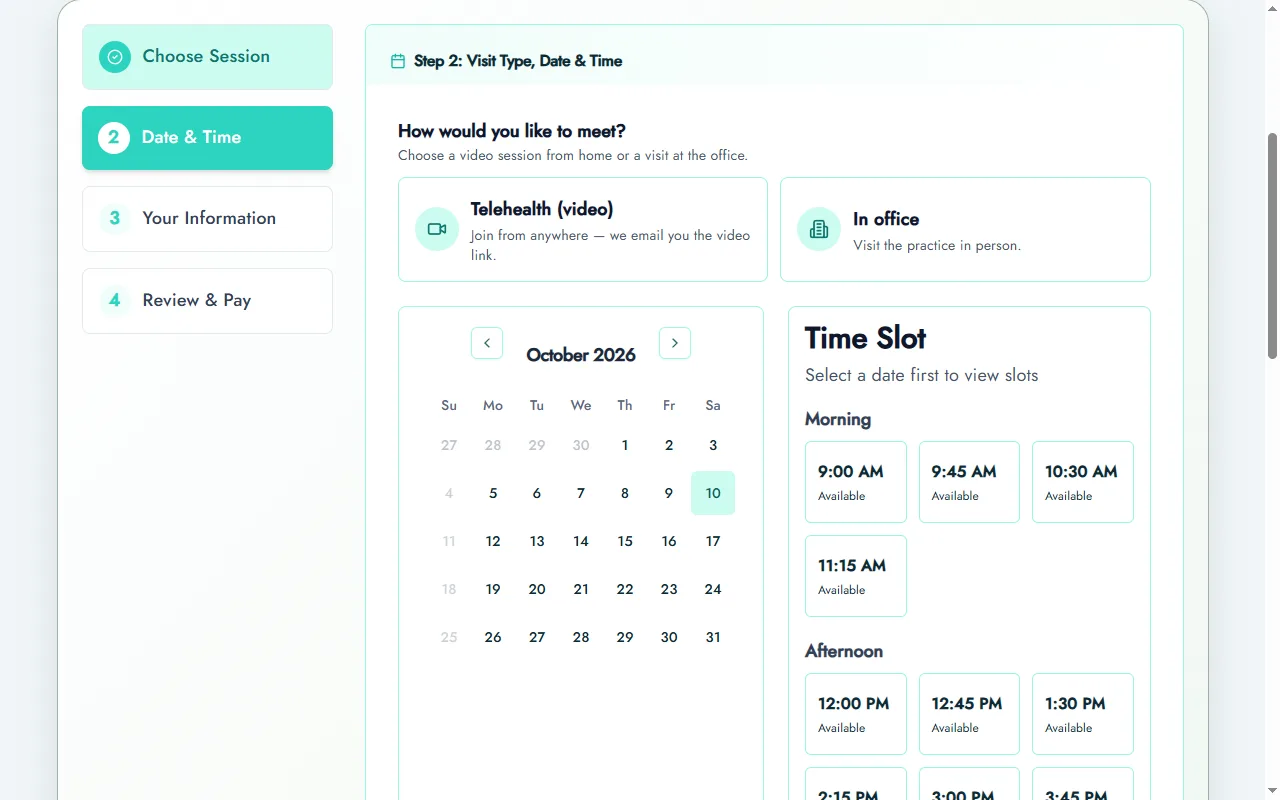
This is where client scheduling software inside a practice system earns its place. In Prexella, online booking walks a new client through choosing a session, choosing telehealth or in office, picking an open time and paying by card, and then into creating their client portal account where your forms are waiting. Every booking path checks the slot on the server before confirming it, so two clients can never take the same hour. Telehealth sessions sit in the same calendar as office sessions; see telehealth scheduling.
Features checklist
Use this list to compare any online appointment scheduling software:
- Clients book on your own website or domain
- The slot is re-checked when the client confirms
- Past dates cannot be booked
- Card payment at checkout
- Intake and consent forms sent automatically
- Reminder emails the day before, with the video link for telehealth
- Weekly recurring sessions
- Prepaid packages or session credits
- One calendar for telehealth and in-person sessions
- A signed Business Associate Agreement if you collect health information
Setting up a new appointment scheduling system in a week
Whichever tool you choose, the setup follows the same order:
- Define your services. Session types, lengths, prices and whether each is telehealth, in person or both.
- Open your availability. The days and hours clients can book, with buffers between sessions.
- Write the rules. How far ahead clients can book, the minimum notice for a booking, and your cancellation window.
- Connect payments. Card at booking, deposits or prepaid packages.
- Attach forms. Intake and consent sent automatically after a new booking.
- Turn on reminders. The day before, with the video link for telehealth.
- Test it as a client. Book, pay, reschedule and cancel from your phone before you share the link.
Most online appointment software can be configured in an afternoon. The week is for testing with a few real clients before you put the link on your website.
Mobile apps vs. web booking
Clients often search for an appointment app, and many tools offer one. For a private practice, a mobile-friendly booking page usually beats a separate app: clients book in the browser they already have, from a link in your website, email signature or directory profile. An appointment booking application is useful for staff who manage the calendar on the go; asking new clients to download one before their first session adds friction. Before you choose online appointment booking software, open the client booking page on your own phone and count the taps from link to confirmed session.
What medical schedulers do differently
Medical scheduling programs are built around the clinic, not the clinician. Scheduling software for medical offices typically adds insurance eligibility checks, room and equipment scheduling, referral tracking and front-desk check-in, which a large outpatient clinic needs and a two-clinician therapy practice does not. If you are comparing a medical scheduler with a practice system, list the features you would actually use. A large salon has the same mismatch in reverse: salon scheduling software assigns chairs and stylists, which a therapist will never need.
A worked example: one week of bookings, two ways
Take a solo counselor with 20 weekly clients, 3 new clients a week and an average of 2 reschedules a week.
With a free booking link plus separate tools: each new client books through the link, then gets an email with a form link, a separate payment request and, for telehealth, a video link. Each reschedule is an email exchange. If each new client takes 15 minutes of follow-up and each reschedule 10 minutes, that is 65 minutes a week, about 50 hours a year, before counting missed payments.
With booking inside a practice system: the new client books, pays and lands in the portal with forms waiting; the confirmation and reminder carry the video link; reschedules happen in the portal within your rules. Follow-up drops to exceptions, perhaps 10 minutes a week.
The numbers are illustrative; time your own week. The pattern holds: the booking itself is fast in every tool, and the cost lives in what happens after it.
Choosing the best appointment scheduling app for you
There is no single best appointment scheduling app; there is a best fit for your volume, how you are paid and whether you collect health information. Score each candidate on the checklist above, give double weight to the items that cost you the most time today, and run a real booking on your phone before you decide.
Beyond scheduling: client management and business tools
Once bookings run themselves, the next bottleneck is everything around them. Appointment management software handles reschedules, cancellations and late-cancel rules. Client management software keeps each client's sessions, forms, payments and messages in one record. Business management software covers income reports, promo codes and marketing.
You can assemble that from separate tools: a meeting scheduler, a form builder, a payment processor and a spreadsheet. Many practices start there. The cost is the time spent copying data between them, and the risk is a client record split across four systems. A practice system keeps the appointment software, client records and business tools in one place.
Our picks by situation
- Fewer than ten clients a month, no health information collected: a free booking link or Calendly's free plan.
- A consulting or coaching business that takes payment at booking: Acuity or a similar appointment booking system.
- A multi-provider medical clinic with a front desk: dedicated medical software for scheduling from your EHR vendor.
- A therapy, counseling or coaching practice with recurring clients, forms and packages: a practice system with booking built in, such as Prexella. See how it works for therapists and for life coaches, or request a demo.
Whatever you choose, ask one question on every demo: "What happens if two clients try to book the same slot at the same second?" The answer tells you how seriously a vendor takes your calendar.
Run your practice from one screen
Booking, superbills, the client portal and marketing on your own domain. See it in a free, one-on-one demo.