

Doctor Appointment Scheduling Software: A Buyer's Checklist
Doctor appointment scheduling software should show real availability, refuse double-bookings on the server, handle in-person and telehealth visits, send reminders and collect intake before the visit. For practices covered by HIPAA, the vendor must also sign a business associate agreement, which rules out most free meeting schedulers.
Use the checklist below to compare doctor scheduling software side by side. Pricing references were verified against each vendor's pricing page on 10/10/2026.
The checklist
Score every option you are considering against these twelve items. Anything marked "must" that a vendor cannot show you in a demo is a reason to walk away.
- Real availability across providers (must): patients see only times a provider can take.
- Server-side double-booking check (must): the slot is re-checked at the moment of booking.
- Past dates blocked everywhere (must): online, at the front desk and on reschedule.
- Visit types (must): in person or telehealth, recorded on the appointment.
- Telehealth link delivery (must for video practices): the join link reaches the patient automatically.
- Automated reminders (must): before every appointment.
- Online intake and consent (must): completed and signed before the visit.
- Payment or insurance capture (must): card at booking, or insurance details and card photos.
- Recurring appointments (should): standing weekly or monthly visits.
- Patient portal (should): appointments, forms and messages in one place.
- Business associate agreement (must for covered entities).
- Clear pricing per provider or per practice (must): total cost at your headcount.
Availability and double-booking
The single most important job of a doctor appointment booking system is to never put two patients in one slot. That sounds basic, but many systems only hide taken slots in the browser. If two patients load the page, pick the same 9:00 a.m. slot and submit a second apart, a browser-only check lets both through.
Ask every vendor directly: "What happens if two patients book the same slot at the same time?" The right answer is that the server re-checks the slot when each booking is submitted and refuses the second one.
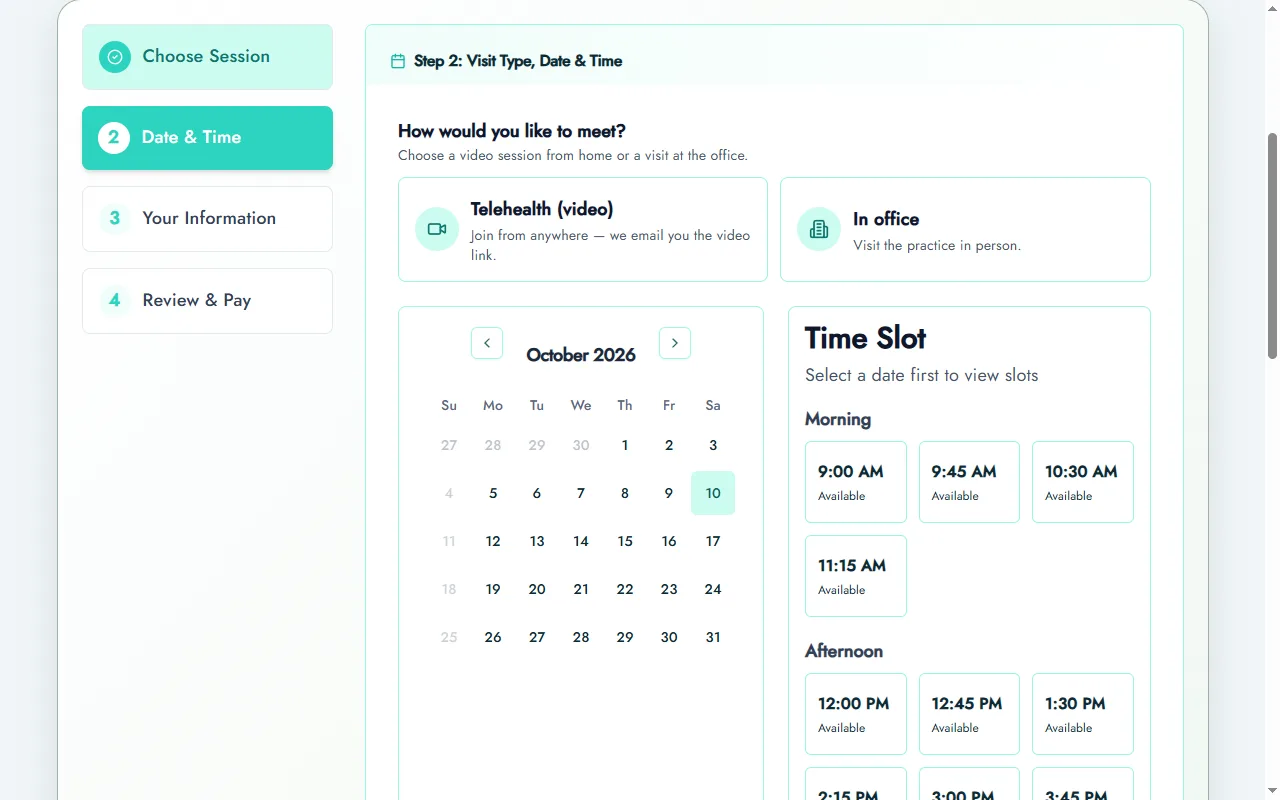
Prexella checks every booking on the server, on the public booking page, in the patient portal and for bookings staff enter manually, and refuses past dates on all of them. See online booking for the full flow.
See it with your own practice
Prexella runs booking, superbills, the client portal and marketing in one system on your own domain. A live demo takes 30 minutes.
A worked example: the 9:00 a.m. race
Here is what server-side checking prevents, step by step.
- At 8:14 p.m., two new patients open your booking page. Both see 9:00 a.m. tomorrow with Dr. Lee as open.
- Patient A fills in their details and submits at 8:16:03. Patient B submits at 8:16:04.
- Browser-only checking: both pages still showed the slot as open, so both bookings are written. Tomorrow at 9:00, two patients arrive for one appointment.
- Server-side checking: when Patient A's request arrives, the server confirms 9:00 is free and books it. One second later, Patient B's request arrives, the server sees 9:00 is taken and refuses it, and Patient B is asked to choose another time before paying.
The second patient is mildly inconvenienced for ten seconds instead of the practice being embarrassed for twenty minutes. Ask every vendor to demonstrate this with two browsers side by side.
Telehealth and visit types
Medical appointment scheduling software should treat telehealth as a visit type, not a separate calendar. The appointment records whether it is virtual or in person, and that choice should flow through to reminders (with the join link) and to billing (with the right place-of-service code).
The Centers for Medicare & Medicaid Services lists place of service codes 02 (telehealth other than in the patient's home), 10 (telehealth in the patient's home, effective January 1, 2022) and 11 (office), accessed 10/10/2026. A scheduler that captures the visit type saves the biller from guessing.
In Prexella, patients choose telehealth or in office at booking, telehealth patients get the join link by email, and the video itself runs in the practice's own HIPAA-ready video tool. The telehealth page explains the setup.
Intake before the visit
Online appointment software for doctors should start intake at the moment of booking. The patient books, receives the forms, and arrives with paperwork complete. That removes clipboard time in the waiting room and typing time at the front desk.
Free therapist intake form template
A ready-to-use intake packet: demographics, insurance, history, consent to treat, telehealth consent, privacy acknowledgment and cancellation policy.
Look for electronic signatures with an audit trail. Prexella records the consent statement, typed name, drawn signature, timestamp, IP address and browser for each signed form.
Reminders
Reminders are the cheapest way to reduce missed appointments. Every doctor appointment scheduling system should send them automatically, include the time, location or video link, and make rescheduling easy. Prexella sends a reminder the day before each appointment, with the join link for telehealth visits.
Business associate agreements
If your practice is a HIPAA-covered entity and the scheduling system stores protected health information, the vendor is a business associate and must sign a BAA. The U.S. Department of Health and Human Services explains the rule in its guidance on business associates.
General meeting schedulers rarely list a BAA. Of the general booking tools we checked on 10/10/2026, Acuity Scheduling lists "Sign BAA for HIPAA compliance" on its Premium plan; Calendly's pricing page does not mention HIPAA or a BAA.
Pricing models compared
How a scheduler is priced matters as much as the price. Pricing verified on 10/10/2026.
| Product | Starting price | How it scales | Scheduling notes |
|---|---|---|---|
| Acuity Scheduling | $16/mo (annual), 1 calendar | By calendar tier: 1, up to 6, up to 36 | BAA on Premium ($49/mo annual) |
| SimplePractice | $49/mo | Additional clinicians from $74/mo each (Plus) | Appointment request widget on Plus |
| Jane App | $59/mo | $35–$40 per additional full-time practitioner | Online booking through a custom-branded site |
| TherapyNotes | $69/mo | $50 per additional clinician | Text or voice reminders 14¢ each |
| Prexella | Flat practice fee, quoted on a demo | Same price as you add providers | Server-side slot checks, telehealth visit type, packages |
Per-provider pricing is predictable for a solo doctor and expensive for a growing group. A flat fee costs more than a solo plan and less once you add providers. Run the numbers at next year's headcount.
Multi-provider practices
Group practices add a layer of complexity that solo practices never see. A doctor appointment scheduling system for a group should let each provider keep their own hours and appointment types, let patients choose a specific provider or "first available", and keep one patient record no matter which provider they see.
Watch for three things when more than one provider shares a calendar:
- Provider-specific services. A new-patient evaluation may only be offered by certain providers. The booking page should only offer valid combinations.
- Coverage and time off. When a provider is away, their slots should disappear for that period, and existing appointments should be easy to move.
- Cost per provider. Per-provider pricing is the norm, so price the system at your expected headcount, including part-time providers.
Waitlists, cancellations and rebooking
Every cancellation is a slot another patient could take. Good medical scheduling programs make it easy to rebook: the patient who cancels can choose a new time in the portal, and the freed slot reappears for online booking immediately. Ask each vendor how quickly a cancelled slot becomes bookable again, and whether the patient can rebook without a phone call.
Cancellation policies should be visible at booking and applied consistently. Where you charge for late cancellations, say so before the patient confirms.
Mobile booking
Most patients book from a phone. A doctor appointment booking app is not required for that; a booking page that works well in a phone browser is enough, and patients do not have to install anything. Test every option on a phone: count the taps from your website to a confirmed appointment, and check that the confirmation email shows the time zone, location or video link clearly. A doctor appointment scheduling app that hides the next available slot three screens deep will lose bookings to the practice down the road.
Doctors online booking system pages also feed search. A booking link on your website and your Google Business Profile lets patients go straight from search to a confirmed slot, so the scheduling software you choose is part of how new patients find you, not just how existing ones rebook.
Reporting and capacity
Medical software for scheduling should tell you how full each provider's week is and where time is being lost. Ask to see:
- Utilization by provider: booked hours against open hours.
- No-shows and late cancellations by provider and appointment type.
- Lead time: how far ahead patients book, which tells you when to open more slots.
- New patients per week and where they came from.
Scheduling software for medical practices that cannot answer these questions leaves capacity decisions to guesswork. Prexella's dashboard shows upcoming, completed and cancelled appointments with revenue by date of service, and saves how each patient heard about the practice at booking.
Patient communication
Doctor appointment booking software is also the practice's main communication channel before a visit. Every message it sends should be clear about four things: when, where (address or video link), what to bring or complete beforehand, and how to reschedule. Review the confirmation and reminder templates in every system you evaluate, and check they use your practice's name rather than the vendor's.
Keep clinical details out of routine messages. A reminder needs the time and place, not the reason for the visit.
Time zones and telehealth across state lines
Telehealth patients may join from a different time zone. Confirmations and reminders should show the appointment time with its time zone, and the booking page should make clear which time zone slots are shown in. Providers licensed in several states should also confirm where the patient is located at the start of each telehealth visit, since licensure generally follows the patient's location.
Integrations
Check how the scheduler connects to everything else you run: your EHR if it is separate, your payment processor, your video platform and your email. Every manual hand-off between systems is a place where an appointment can go missing. One system that covers scheduling, intake and payment avoids most of those hand-offs; a scheduler that needs five integrations to do the same job adds five points of failure.
Where Prexella fits, and where it does not
Prexella is healthcare scheduling software for outpatient private practices: psychology, therapy, counseling, coaching and nutrition. It combines booking, the patient portal, e-signed intake, payments, prepaid credits and superbills on your own domain. The psychologists and dietitians pages show how it works for each.
It is not a medical EHR. There is no e-prescribing, lab ordering or medical charting, and Prexella does not submit insurance claims itself; its insurance workspace prepares claims for your biller to submit through their own clearinghouse. Primary-care and specialist practices should choose scheduling inside an EHR built for those workflows.
How to test doctor appointment scheduling software in a demo
Bring these to every demo:
- Book the same slot from two browsers at once. What happens?
- Book a telehealth visit. What does the patient receive, and when?
- Show the intake forms a new patient gets, and the signed copy afterward.
- Show reminders and how a patient reschedules.
- What is the total monthly cost with our providers and the add-ons we need?
- Will you sign a BAA?
To see Prexella answer those with your own appointment types, request a demo.
Bottom line
Choose doctor appointment scheduling software that refuses double-bookings on the server, treats telehealth as a visit type, starts intake at booking, sends reminders automatically and comes with a BAA. Then compare pricing at the number of providers you expect next year.
Run your practice from one screen
Booking, superbills, the client portal and marketing on your own domain. See it in a free, one-on-one demo.