

Free Online Scheduling Tools vs Paid Booking Software
A free online scheduling tool is enough when you only need people to pick a time on your calendar; it stops being enough once you need payments, reminders, intake forms or packages, which free plans usually leave out. For a growing practice, the real cost of a free tool is the admin time it pushes back onto you.
Below is what the free plans from common scheduling tools and practice platforms actually include, verified against their pricing pages on 10/10/2026, and a simple way to decide when to pay.
What a free online scheduling tool usually includes
Most free appointment scheduling software follows the same pattern. The free tier gives you:
- One booking page or event type.
- Connection to one calendar.
- Email confirmations.
And it leaves out:
- Payment at booking.
- Automated reminders.
- Multiple services or team members.
- Intake forms and packages.
- Removing the vendor's branding.
That split is deliberate. The free tier proves the product works; the features that save real time sit on paid plans.
Free plans compared
Pricing verified on 10/10/2026 from each vendor's official pricing page.
| Tool | Free plan | What it covers | What needs a paid plan |
|---|---|---|---|
| Calendly | Yes, "Always free" | Basic booking pages | Payments (Stripe, PayPal) and reminders on Standard, $10/seat/mo billed yearly |
| Google Calendar | Yes | One booking page for one appointment type | Multiple pages, Stripe payments, reminders on eligible Workspace plans |
| Square Appointments | Yes, for solo professionals | Booking with Square payments | Team features on paid plans |
| Practice Better | Sprout, free | Students and recent grads, up to 3 clients | Telehealth from Starter, $35/mo |
| Sessions Health | Freemium | Up to 3 clients, 1 practitioner | Unlimited clients on Professional, $39/mo |
| Carepatron | Free | Unlimited clients, telehealth, 1 GB storage, client portal | Branding and more email sends on paid plans |
| Upheal | Free | AI text-to-note and dictation, individual therapy | AI notes $39/mo; EHR $1 per session |
See it with your own practice
Prexella runs booking, superbills, the client portal and marketing in one system on your own domain. A live demo takes 30 minutes.
Free scheduling tools for meetings
If you book calls rather than sessions, a meeting scheduler free tier is often all you need.
Calendly Free
Calendly's free plan is the best-known meeting scheduling tool. Share a link, let people choose a time, and the meeting lands on your calendar. Payments and automated reminders arrive on the Standard plan.
Google Calendar appointment schedules
If you use Google Calendar, you already have a free online booking system from Google: one shareable booking page for one appointment type. That makes appointment scheduling software in Google Calendar a quick start for a solo consultant. For more than one service, payments or reminders, Google points to eligible Workspace business plans; the page lists Business Standard, Business Plus and Enterprise.
Free tools for appointments and practices
A free appointment booking app for a practice needs more than a link: client records, forms and some way to handle payment.
Square Appointments free plan
Square's free plan targets solo professionals who take payments with Square. It suits a service business that already uses Square in person.
Practice platforms with free tiers
Practice Better, Sessions Health, Carepatron and Upheal each have a free plan built for practitioners. The catch is the limits: three clients on Practice Better's Sprout and Sessions Health's Freemium, storage and email limits on Carepatron's free plan, and individual therapy only on Upheal's. They are useful for students and very small caseloads, and a way to test the product before paying.
The hidden cost of free
A free online scheduler moves work from the software to you. Count the time you spend each week on:
- Payments: sending invoices, checking who paid, chasing late payments.
- Reminders: texting or emailing clients the day before.
- Forms: emailing intake documents and filing returned copies.
- Rescheduling: back-and-forth messages to find a new time.
- Packages: tracking how many sessions a client has left.
If those tasks take two hours a week and your time is worth $100 an hour, a free tool costs you about $800 a month in time. A paid booking system that removes most of that work pays for itself quickly.
What paid booking software adds
Paid appointment scheduling apps vary, but the features that justify the cost for a practice are consistent:
- Payment at booking, so no-shows still pay or forfeit a credit.
- Automatic reminders before every appointment.
- Intake and consent forms sent and signed before the first visit.
- Packages and prepaid credits tracked automatically.
- Your branding instead of the vendor's.
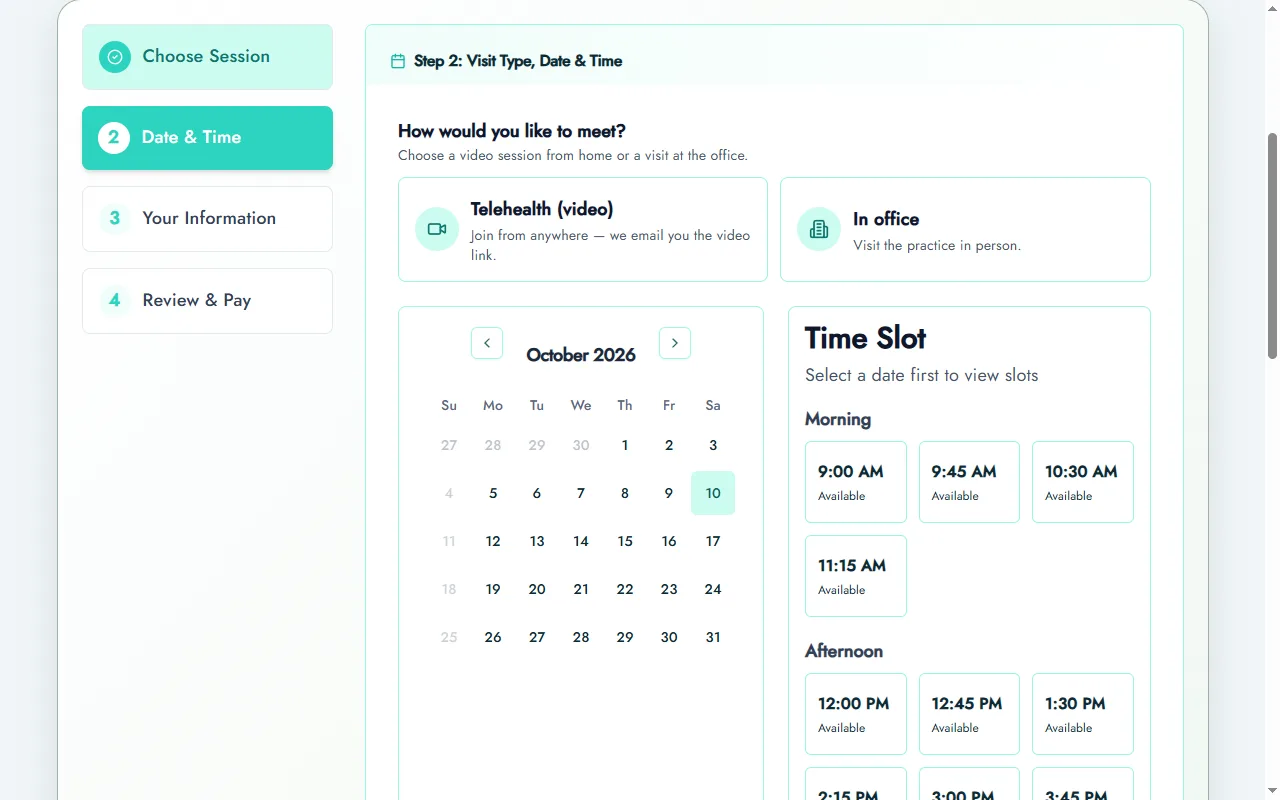
In Prexella, for example, clients pay by card when they book, packages book a series of weekly dates in one checkout, and session credits let clients prepay. Reminders go out the day before each session, and clients whose credit balance is running low get an email three days ahead. It is not free; it is priced as one flat fee for the practice and quoted on a demo.
Privacy: when free is not an option
Healthcare providers covered by HIPAA need a business associate agreement with any vendor that stores protected health information. None of the free meeting schedulers above list a BAA on their pricing pages; among general tools, Acuity Scheduling lists one on its Premium plan. The U.S. Department of Health and Human Services explains the requirement in its guidance on business associates.
Professional bodies make the same point. The American Psychological Association's telepsychology guidelines ask psychologists to understand the security of the technologies they use with clients.
Getting the most from a free tool
If a free plan fits today, set it up so the switch later is painless.
Use one booking link everywhere. Put it in your website header, email signature and social profiles. When you move to paid software, you change one link.
Write your policies on the booking page. Even a free online appointment scheduling page usually has a description field. Put your cancellation rule and what to expect there.
Collect the minimum. Name, email and phone. Do not collect health details through a free meeting tool that has no business associate agreement.
Keep a simple client list. Export bookings monthly to a spreadsheet you control, so you are not locked in.
Watch the signals. When you start sending payment links after bookings, or texting reminders by hand, the free tool has stopped saving time.
Free apps vs free web tools
Some people search for a free app for booking appointments; others for a free online booking application in the browser. For clients, a web booking page usually beats an app: nobody installs an appointment app free or not just to book one session with you. The best appointment scheduling app for small business owners is often the one that runs in a phone browser, with an appointment calendar app on your side so you can see the day at a glance.
The same applies to scheduling website free builders and free website booking system plugins. They work, but each adds a place where your availability can drift out of sync. One booking system connected to your calendar is safer than a widget on every page.
Moving from free to paid
When you outgrow a free online appointment scheduling software plan, move in this order:
- Choose the paid system and set up services, hours, policies, payment and reminders.
- Point your one booking link at the new system.
- Leave already-booked appointments where they are; let them run out over a few weeks.
- Turn off the free tool once its calendar is empty.
Clients barely notice, except that booking now takes payment and sends reminders.
Free options for therapists and coaches
Therapists and coaches face one extra constraint: privacy. A coach booking discovery calls can use any free scheduling tool. A therapist booking clinical sessions should treat appointment details as sensitive and check whether the vendor will sign a business associate agreement before putting any client information into it.
For a solo coach, Calendly's free tier or Google Calendar's free booking page covers discovery calls well, and a paid practice system can take over once paying clients arrive. For a therapist, the practice platforms with free tiers, such as Sessions Health's Freemium plan (up to three clients) or Carepatron's free plan, are designed for clinical work from the start, though their limits are tight.
Free tools for specific jobs
Different jobs call for different free tools, and it is worth matching them deliberately rather than using one free booking software for everything.
- Discovery calls and meetings: a meeting scheduler, such as Calendly's free tier or a Google Calendar booking page. A scheduling tool free online is ideal here because nothing sensitive is collected.
- Single paid appointments for a solo business: a free appointment scheduling app tied to a payment processor you already use, such as Square's free plan.
- Salons and beauty pros: a free salon booking app is usually a limited tier of a salon platform; expect paid upgrades for staff calendars and deposits.
- Health and therapy practices: a practice platform's free tier, or a paid plan with a BAA.
Whatever the job, the best appointment booking app is the one clients can use without an account or a download. A web based scheduling tool or online scheduling app that opens straight from a link beats any booking appointment app that asks clients to install something first, and a booking appointment app free of charge still costs you bookings if clients give up halfway. If you are comparing a free appointment scheduling app for small business use against paid options, judge them on the same online appointment scheduling tool checklist: availability, payment, reminders, intake and branding.
What to check in the terms
Free plans change more often than paid ones. Before you build your booking around one, check:
- Branding: whether the vendor's name appears on your booking page and emails.
- Limits: event types, bookings per month, clients or storage.
- Data: whether you can export your bookings and client list.
- Changes: whether the free tier has been reduced before; past changes predict future ones.
How to choose: free or paid
Use a free scheduling tool if:
- You book calls or meetings, not paid sessions.
- You have a handful of clients and no plans to grow this year.
- You do not handle health information.
Move to paid booking software if:
- You take payment for sessions.
- You sell packages or memberships.
- You send intake or consent forms.
- You need a BAA.
- You want clients to see your brand, not the vendor's.
For a broader comparison of practice platforms, see SimplePractice alternatives. Coaches can see how packages and credits work on the life coaches page.
Bottom line
A free online scheduling tool is a fine start for meetings and very small caseloads. As soon as you take payments, send forms or sell packages, the time a free tool costs you outweighs the subscription it saves. Compare free tiers by what they leave out, not what they include, and when you are ready to see a full booking system with your own services, request a Prexella demo or read how online booking works.
Run your practice from one screen
Booking, superbills, the client portal and marketing on your own domain. See it in a free, one-on-one demo.