

Appointment Management Software: Reminders, Reschedules and Packages
Appointment management software is everything that happens to a booking after it is made: reminders, reschedules, cancellations, recurring slots and payment. Booking tools get clients onto the calendar; management tools keep them there and keep you paid.
Appointment management software handles everything after a client books: reminders, reschedules, cancellations and fees, recurring slots and prepaid packages. If your calendar is full but your income still leaks through no-shows, late cancellations and unpaid sessions, the gap is in how appointments are managed, not how they are booked.
This guide is for therapy practices, coaches, wellness studios and salons alike. The software categories overlap more than vendors admit (many products now sell themselves as appointment & client management software), and the same five jobs decide whether a tool earns its fee.
What appointment management software actually does
A booking page is the front door. Appointment management software is the rest of the building. Here are the five jobs it has to do.
1. Keep the calendar honest
An appointment scheduling system is only as good as its availability rules. It should know your working hours, buffers between sessions, blocked time and holidays, and it should refuse a booking that collides with another one, even when two clients click the same slot at the same second. The safest systems check the slot again on the server at the moment of confirmation rather than trusting what the browser showed.
2. Remind clients without you lifting a finger
Automatic reminders are the cheapest no-show fix there is. Look for reminders that go out on a fixed schedule, include the date, time and place (or the video link for telehealth), and carry your practice's name. In healthcare, keep reminders free of clinical detail: a reminder should say when and where, not why.
3. Handle changes without the phone
Clients reschedule. Good appointments software lets them do it themselves inside rules you set, such as no changes within 24 or 48 hours, and logs every change. Without self-service rescheduling, every change becomes a phone call or an email thread.
4. Hold recurring clients in place
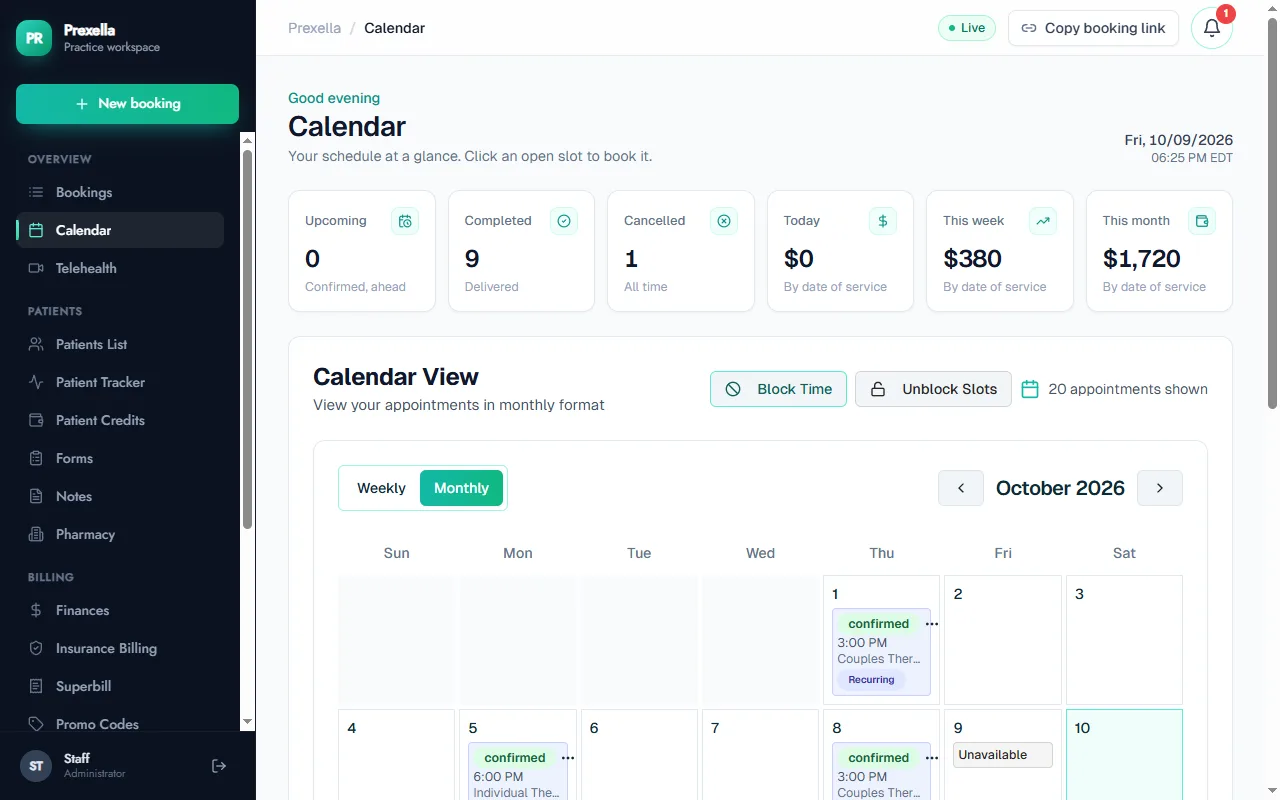
Weekly therapy clients and regular salon clients want the same slot every week. Appointment calendar software should hold a recurring slot so no one else can book it, without you re-entering it every week.
5. Connect appointments to money
The appointment is the unit you are paid for, so it should carry its payment: paid at booking, drawn from a prepaid package, or flagged as owed. A late cancellation should apply your fee or deduct a credit automatically rather than relying on you to remember.
Scheduling vs management: a comparison
| Job | Basic scheduling app for business | Appointment management software |
|---|---|---|
| Online booking | Yes | Yes |
| Double-booking protection | Usually in the browser only | Checked on the server at confirmation |
| Reminders | Often a paid add-on | Automatic, on a schedule |
| Self-service reschedule and cancel | Sometimes | Yes, within your rules |
| Late-cancel and no-show fees | Rarely | Applied automatically |
| Recurring slots | Manual | Held automatically |
| Prepaid packages and credits | No | Yes |
| Client record and history | Minimal | Full history per client |
Most good scheduling apps cover the first two rows well. The money is in the bottom five.
See it with your own practice
Prexella runs booking, superbills, the client portal and marketing in one system on your own domain. A live demo takes 30 minutes.
Appointment management for therapy practices
Therapy practices have two extra constraints: demand is high and sessions are recurring. More than half of psychologists reported having no openings for new patients in the American Psychological Association's 2024 Practitioner Pulse Survey (reported 10/08/2025). When every slot is taken, a no-show is a slot another client could have used.
Three therapy-specific requirements:
- Visit type on every booking. Telehealth and in-office sessions should sit in the same calendar, with the visit type recorded so reminders carry a video link only when needed and billing uses the right place-of-service code.
- Good Faith Estimates for self-pay clients. Under the No Surprises Act, providers generally must give uninsured or self-pay clients a Good Faith Estimate when they schedule care at least three business days ahead or ask for one (CMS). Your appointment workflow is the natural place to trigger it.
- Late-cancellation policy in writing. Clients should agree to your cancellation policy before their first session, ideally as a signed form.
Prexella handles this flow for private-pay practices. Clients choose telehealth or in office when they book, a reminder goes out the day before every session (with the video link for telehealth), and recurring clients keep their weekly slot. A cancellation or no-show within 48 hours applies your credit penalty automatically. See therapists and counselors for the full workflow.
Packages and prepaid credits
Prepaid packages change appointment management from chasing invoices to tracking balances. A client buys a block of sessions, each completed appointment draws one down, and the software tells both of you when the balance runs low.
In Prexella, clients buy session credits in the client portal. Three days before a session, clients with zero or one credit left get an automatic email to top up, and clients on a package get a reminder before their final package session. The dashboard shows every client's balance, so month-end reconciliation is a glance rather than a spreadsheet.
Packages suit:
- Weekly therapy or coaching clients who prefer to pay once a month.
- Programs with a fixed number of sessions, such as a six-session parenting program.
- Salon and spa series, such as a course of facials or lash fills.
Appointment management for salons and spas
Salon and spa owners search for the same thing under different names: salon appointment software, scheduling software for salons, a booking system for hair salon teams, or salon and spa software. The jobs are the same five, with three differences:
- Staff calendars. Booking software for salons has to handle several stylists with different menus and prices, and processing time inside a service. Hair salon appointment software that cannot book into the gap while color develops wastes chair time.
- Rooms and equipment. A booking system for beauty salon and spa services often needs a treatment room as well as a person.
- Walk-ins and retail. Many salons need a point-of-sale flow that therapy practices never use.
When you compare beauty salon scheduling software, beauty salon booking software and beauty salon appointment software, test them on a busy Saturday's worth of bookings, not a quiet Tuesday. Beauty salon appointment scheduling software that copes with overlapping short and long services is worth paying more for. For a deeper comparison, read salon appointment scheduling software: how to choose.
Free options exist. A free online booking system for salons, or other salon scheduling apps with $0 plans, covers booking and basic reminders for a solo stylist. Teams usually outgrow them when they need deposits, cancellation fees and multi-staff calendars. An online booking system for salons that charges per transaction instead of per month can still be the cheaper option at low volume.
Free scheduling apps vs paid appointment management
There are great scheduling apps that cost nothing, and a free scheduling app for employees or a single calendar is fine for internal meetings. The question is what you lose:
| Free scheduling app | Paid appointment management software | |
|---|---|---|
| Client-facing booking | Basic | Branded, on your domain |
| Payments | Separate tool | Built in |
| Reminders | Limited | Automatic, branded |
| Cancellation rules and fees | No | Yes |
| Packages | No | Yes |
| Client records | No | Yes |
| Health data protections | Usually not designed for it | Varies; ask for a BAA |
If you see clients for health services, ask any vendor whether it will sign a business associate agreement before you put client appointments into it. Many free scheduling tools are not designed for health information.
Writing your cancellation and reschedule policy
Appointment management software can only enforce rules you have written down. A clear policy covers:
- The notice window. How much notice a client must give to cancel or reschedule without a fee, for example 24 or 48 hours.
- The fee. A fixed fee, the full session fee, or one prepaid credit.
- Exceptions. Illness, emergencies, weather, and how often you will waive the fee.
- No-shows. What counts as a no-show, such as 15 minutes late without contact, and the fee.
- How to cancel. Through the portal, by email or by phone, and what counts as notice.
Have every client sign the policy before the first session, then let your software apply it consistently. Inconsistent enforcement is what makes cancellation policies feel unfair to clients.
Numbers to watch every month
| Metric | How to calculate | Why it matters |
|---|---|---|
| No-show rate | No-shows divided by booked sessions | Tells you whether reminders and policies work |
| Late-cancel rate | Late cancellations divided by booked sessions | Shows whether your notice window is right |
| Fill rate | Booked hours divided by available hours | Shows real capacity |
| Rebook rate | Clients with a next session booked divided by active clients | Early warning of drop-off |
| Prepaid share | Sessions paid by credits divided by all sessions | Shows cash-flow stability |
Good appointment management software should give you the inputs for these without a spreadsheet of your own.
A checklist before you choose
- Two clients clicking the same slot at once: does only one booking go through?
- Can a client book a date in the past? (They should not be able to.)
- Do reminders go out automatically, and what do they cost?
- Can clients reschedule themselves within your rules?
- Does a late cancellation apply your fee or credit rule without you?
- Are recurring clients held in their weekly slot?
- Can clients prepay for packages, and can you see balances?
- Is telehealth vs in person recorded on each appointment?
- Does it run under your brand, or the vendor's?
- Can you export your client list and appointment history?
The bottom line
Appointment management software earns its fee after the booking: reminders that run themselves, rescheduling within your rules, cancellation fees that apply automatically, recurring slots that hold, and payments tied to every session. Scheduling is the easy part. If you run a private-pay practice and want all five jobs in one system under your own name, see how Prexella's online booking and session credits work together in a free demo.
Run your practice from one screen
Booking, superbills, the client portal and marketing on your own domain. See it in a free, one-on-one demo.