

Client Portal Software: What It Should Do for Your Practice
Most practices buy a portal for forms and end up using a fraction of it. Here is what a portal should handle, what to check before you choose one, and how to get clients to actually use it.
Client portal software gives each client one secure place to book and reschedule sessions, sign forms, message you, pay and see their documents, so those tasks stop arriving in your email. A good portal is part of the booking flow, works in any browser without an app, and carries your practice's brand rather than the vendor's.
What client portal software is
A client portal is a signed-in space for the people you serve. Medical practices usually call it patient portal software; therapists, counselors and coaches usually call it an online client portal; in other industries it is customer portal software. The names differ, the job is the same: move the routine back-and-forth of care out of email and phone calls and into one secure place.
For a small practice the payoff is time. Every intake packet that a client signs in the portal is one you do not have to scan. Every reschedule a client handles themselves is a phone call you do not return.
What a client portal should let clients do
Book, reschedule and see appointments
Clients should see upcoming and past sessions, book new ones from the times you have opened, and reschedule within your rules. For telehealth sessions, a join button or link on the appointment saves the "where is the link?" email.
Complete and sign forms
Intake, informed consent, telehealth consent, privacy practices acknowledgment and releases of information all need a signature before the first session. In the portal, clients complete them on any device and sign electronically. Look for signatures captured with an audit trail under the federal ESIGN Act and state UETA laws: the consent statement, the signer's typed name, a timestamp, and the device details.
Pay and track balances
Card payment, prepaid packages and a visible balance mean fewer awkward conversations at the end of a session.
Message securely
A messaging thread inside the portal keeps clinical communication out of personal email and text.
Complete check-ins between sessions
Standardized measures such as the PHQ-9 and GAD-7 work best when clients complete them before a session, so you start with a score instead of a questionnaire.
Access their records
Under HIPAA, a covered provider must act on a request for access no later than 30 days after receiving it, with one 30-day extension allowed, and must provide an electronic copy in the form requested if it is readily producible; psychotherapy notes are excluded from that right (45 CFR 164.524, Cornell LII, checked 10/10/2026). A portal that lets clients download their own forms and superbills makes many of those requests unnecessary.
See it with your own practice
Prexella runs booking, superbills, the client portal and marketing in one system on your own domain. A live demo takes 30 minutes.
A checklist for comparing portals
Take this into every demo:
| Capability | Why it matters | Question to ask |
|---|---|---|
| Browser-based, no app | Clients sign in from any device | "Does it work on a phone without an app?" |
| Part of the booking flow | New clients create an account as they book | "What happens right after a new client pays?" |
| E-signed forms with audit trail | Signed consent before session one | "What is recorded when a client signs?" |
| Telehealth join links | Fewer missed video sessions | "Where does the client find the link?" |
| Payments and packages | No unpaid sessions | "Can clients prepay for several sessions?" |
| Secure messaging | Clinical messages out of email | "Is messaging inside the portal?" |
| Check-ins | Scores before the session | "Which measures are built in and scored?" |
| Private document storage | Uploaded IDs and cards stay private | "Are uploads public links or signed links?" |
| Automatic sign-out | Shared devices are common | "Does an idle session sign out?" |
| Your branding and domain | Clients trust your practice, not a vendor | "Whose name do clients see at sign-in?" |
Security questions to ask any portal vendor
A portal holds health information, so ask:
- Will you sign a Business Associate Agreement? HHS treats a cloud service that stores electronic protected health information on a provider's behalf as a business associate (HHS cloud computing guidance).
- How are uploaded documents stored? Driver's licenses and insurance cards should sit in private storage and be shown through short-lived signed links, not permanent public URLs.
- What happens on a shared computer? An idle session should warn the client and sign them out.
- How do clients reset a password? Self-serve reset by email prevents support calls and insecure workarounds.
The client management portal for your side of the practice
The portal is half of the picture. The other half is the staff view that the portal feeds: a client management portal or patient management portal where you send forms, see who has signed, read check-in scores and track balances.
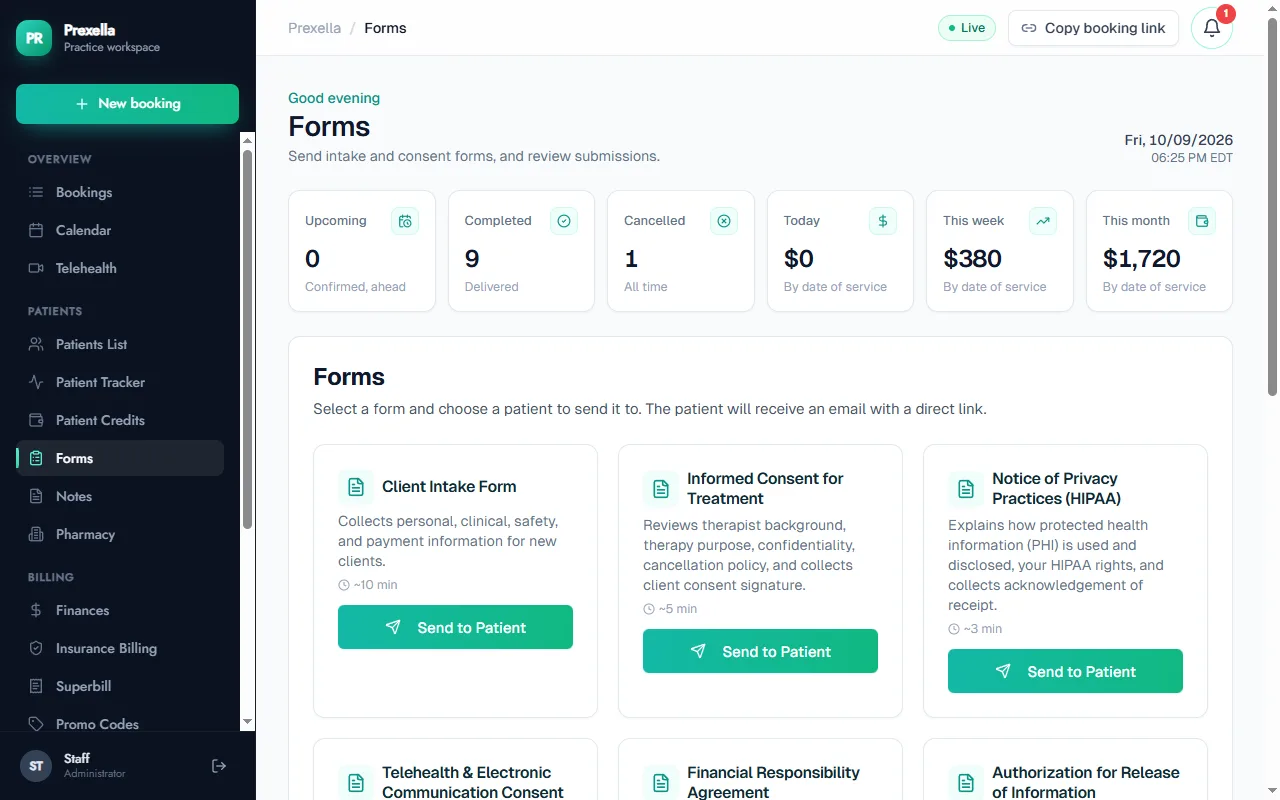
When a client signs in the portal, the signed form should appear on their record in your dashboard without anyone uploading anything. When they complete a GAD-7, the score should be waiting before the session. If a vendor's demo shows the client side and the staff side as two separate systems, expect to do the syncing yourself.
How Prexella's client portal works
Prexella's client portal runs in any browser on the practice's own domain. New clients are guided into creating their account right after they book and pay, with the booking already attached. From there, clients can:
- Book and reschedule sessions, choosing telehealth or in office, and join video sessions from the appointment
- Complete and sign intake, consent, telehealth consent and privacy forms with ESIGN and UETA e-signatures
- Buy and track prepaid session credits
- Message the practice securely
- Complete PHQ-9, GAD-7 and other check-ins, scored and saved to their record
- Keep a private journal and work through workbooks
- Add insurance details and card photos, or choose to self-pay
Uploaded documents are stored privately and shown through signed links that expire, and an idle session signs out after a warning. The portal reminds clients about unfinished forms and missing profile details before their visit.
Getting clients to use the portal
Adoption is a design problem, not a persuasion problem:
- Make the portal step one. If the first thing after booking is "create your account to finish," nearly every new client does it.
- Put something they need in it. Forms to sign before the first session, the video link, their superbill.
- Keep it short. Five intake forms on a phone is a lot. Split required forms from optional ones.
- Say it once at intake. "Everything for your sessions is in the portal: reschedules, forms and receipts."
- Stop answering by email. Reply with a link to the portal when a client emails a reschedule request, and within a month most stop emailing.
Rolling a portal out to existing clients
New clients adopt a portal at booking. Existing clients need a nudge. A rollout that works in most practices:
- Announce it in session a week ahead: what it is, what it replaces, and that it works on a phone.
- Send the invitation by email with one action, such as "sign your updated consent form."
- Move one routine task at a time. Reschedules first, then forms, then receipts and superbills.
- Help in person. Spend two minutes at the end of a session walking a hesitant client through sign-in.
- Set a date after which forms and receipts come only through the portal.
Expect some clients to need a reminder or two. Older clients and clients with limited internet access may need a paper alternative; keep one available.
What to keep out of the portal
A portal is for the routine. Some things belong elsewhere:
- Psychotherapy notes. These are excluded from the HIPAA right of access and most clinicians keep them separate from the shared record.
- Crisis communication. A portal is not monitored around the clock. Say so on the messaging screen, and give crisis resources such as 988 in the US.
- Long clinical conversations. Messaging works for logistics; therapy happens in session.
Accessibility and language
Clients use portals on old phones, with screen readers, and in second languages. Before you choose, test the client side with the text size turned up, check that forms can be completed with a keyboard alone, and ask whether forms can be offered in the languages your clients speak. A portal clients cannot use becomes an email inbox again.
Setting up your portal: a step-by-step plan
- Decide what clients can do themselves. Booking new sessions, rescheduling within your notice window, cancelling, messaging, paying. Write down any rule, such as "no rescheduling inside 48 hours."
- Build the intake packet. Intake form, informed consent, telehealth consent, notice of privacy practices acknowledgment, financial responsibility agreement and release of information. Mark which are required before the first session.
- Choose your measures. For example, PHQ-9 and GAD-7 at intake and every four weeks. Decide who reviews flagged results and how quickly.
- Write the welcome message. Two sentences on what the portal is for, and one on what it is not for (crises).
- Test as a client. Create a test account on your phone: book, sign every form, send a message, buy a session and download a receipt.
- Turn it on for new clients first. Then roll it out to existing clients over the next month.
Common portal mistakes
- Too many required forms. Eight forms on a phone before session one drives drop-off. Keep the required set short and move the rest later.
- No fallback for clients who cannot use it. Keep a paper or phone option.
- Messages without expectations. If clients do not know your reply time, they will expect an instant one. State it on the messaging screen.
- Two places for the same thing. If forms also go out by email from another tool, clients will not know which to use.
What a portal costs, and what it saves
Most practice systems include a client portal in the base price rather than selling it separately, so the real cost is setup time: writing your forms, deciding what clients can do themselves, and inviting existing clients. The savings show up in your week. Count, for one week, every email and call about reschedules, form links, receipts, video links and balances, and estimate the minutes each took. That number is roughly what a well-used portal gives back each week, every week.
There is also a quality gain that is harder to price. Forms completed and signed before the first session mean the first session starts with the history already read. Check-in scores completed before each session mean you start with data rather than a questionnaire. Receipts and superbills in the portal mean clients claim out-of-network benefits on time, and clients who are reimbursed reliably are more likely to stay in care.
Choosing between portals
If your practice is insurance-heavy and you already use an EHR, start with the portal included in it. If you are private-pay and building a brand, weigh where clients sign in and whose name they see as heavily as the feature list. Counselors can see how this fits a typical caseload on the counselors page, and therapists on the therapists page. To see the client and staff sides together with your own forms, request a demo.
Run your practice from one screen
Booking, superbills, the client portal and marketing on your own domain. See it in a free, one-on-one demo.