

How to Switch From SimplePractice: Why Practices Leave and Where They Go
Practices look for SimplePractice alternatives for four reasons: per-clinician fees as they hire, paid add-ons, no custom branding, and price changes. Which alternative fits depends on whether your revenue is in-network claims, private pay, or wellness programs.
Practices switch from SimplePractice when per-clinician fees, paid add-ons, the lack of their own branding or a price change make the numbers stop working. Where they go depends on how they earn: in-network claims, private pay, wellness programs or a multi-discipline clinic each point to a different system.
This post explains the reasons in detail, matches practice types to alternatives, and lays out a switch that does not lose records. For the full side-by-side table of nine options, see SimplePractice alternatives compared. Pricing verified on 10/10/2026.
Why practices look for SimplePractice alternatives
SimplePractice is a capable, widely used system for therapists. Practices rarely leave because it fails; they leave because it stops fitting.
1. Per-clinician fees as the practice grows
SimplePractice lists Starter at $49, Essential at $79 and Plus at $99 a month, and adding clinicians is a Plus feature "starting at $74/clinician" (SimplePractice pricing, verified 10/10/2026). For a solo therapist that is predictable. For a practice hiring associates, every hire adds at least $74 a month, so the software bill grows with headcount.
A three-clinician practice on Plus starts at $99 + 2 × $74 = $247 a month at list price, before any add-ons. A five-clinician practice starts at $395.
2. Add-ons on top
The AI suite (Care Aide) is listed at $59 a month for the account owner plus $49 for each additional clinician, AI Note Taker at $35 a month, and ePrescribe at $49 a month plus an $89 setup fee (SimplePractice pricing, verified 10/10/2026). None are required, but practices that want them pay for each separately.
3. Your brand, or theirs
SimplePractice's pricing page lists a client portal website and mobile app but does not list custom branding or a custom domain. For practices building a brand, especially private-pay practices that market themselves, clients signing into a vendor-branded portal is a real cost.
4. Price changes and support
Reviewers on SoftwareFinder describe steep price increases alongside frustration with support (SoftwareFinder reviews). Reviews are anecdotal, but price changes are a pattern across the category: TherapyNotes, for example, raised its prices from December 1, 2025 (TherapyNotes announcement).
Match your practice to an alternative
Therapy practice management software splits into a few families. Find the row that describes your revenue, not your specialty.
| If your practice is mostly... | Look at | Why |
|---|---|---|
| In-network insurance claims | TherapyNotes, Sessions Health | Claims-first; TherapyNotes Group is $79 + $50 per additional clinician; Sessions Health $39 + $29 |
| Private pay and out-of-network | Prexella | Flat practice fee, superbills, prepaid credits, your own domain |
| Nutrition, wellness, coaching programs | Practice Better, Healthie | Programs and packages; Practice Better has a free plan; Healthie starts at $19 |
| Multi-discipline clinic (physio, massage, counseling) | Jane | Polished booking across disciplines; $59 to $99 plus $35 to $40 per full-time practitioner |
| Budget-first, solo | Carepatron, Sessions Health | Free plans with limits |
| AI notes as the priority | Upheal | Free plan; $39 a month AI Notes; EHR at $1 per session |
All prices from each vendor's pricing page, verified 10/10/2026; sources in the full comparison.
Private pay: the case for a different kind of system
The share of practices that run without insurance is not small. In the American Psychological Association's 2024 Practitioner Pulse Survey, 34% of psychologists said they do not accept any form of health insurance, and 82% of those who left or never joined networks cited insufficient reimbursement rates (APA 2024 survey, reported 10/08/2025; APA report).
For those practices, claims tools are overhead. What matters is getting paid up front, making out-of-network reimbursement easy for clients, and building a brand. That is the gap Prexella is built for:
- One-click superbills from completed sessions, with CPT, ICD-10, NPI, EIN and place of service filled in.
- Prepaid session credits, so clients pay ahead and you stop invoicing.
- White-label booking, client portal and email on your own domain.
- One flat fee for the practice, quoted on a demo, rather than a per-clinician price.
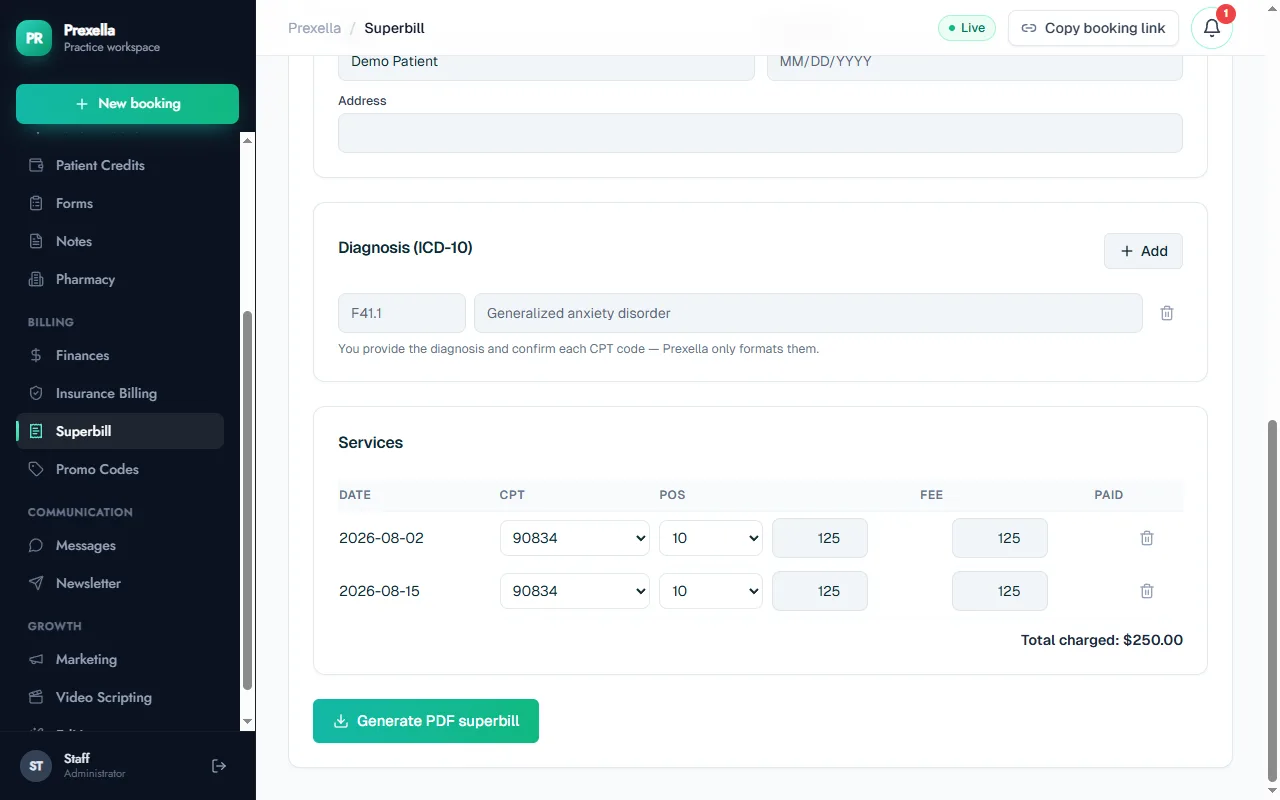
Prexella is not the right move for an insurance-heavy practice. Its insurance workspace hands claims to your biller to submit through their own clearinghouse rather than submitting them directly, and it does not offer AI notes or e-prescribing.
See it with your own practice
Prexella runs booking, superbills, the client portal and marketing in one system on your own domain. A live demo takes 30 minutes.
Medical and multi-specialty practices
Some readers searching for SimplePractice alternatives run something broader than a therapy practice: a medical practice adding behavioral health, or a clinic with several services. Medical practice management software, doctor practice management software and healthcare practice management software usually means claims-heavy systems built around insurance billing and medical coding. Clinic management software and patient management software for a multi-specialty clinic need multi-provider calendars, rooms and often e-prescribing.
If that is you, SimplePractice and most therapy-focused alternatives are a partial fit at best. Jane covers multi-discipline allied health well; full medical clinics usually need a medical EHR. The therapist practice management software on this list is built for behavioral health and wellness.
When staying on SimplePractice is the right call
Switching has a cost in time and attention, and some practices are better off staying. SimplePractice is likely still the right system if:
- You are solo and expect to stay solo. The per-clinician price never applies, and the Starter or Essential plan may cost less than any switch is worth.
- Most of your revenue is in-network. Its insurance tools sit at the center of the product, and the claims workflow is familiar.
- You rely on its documentation tools. Treatment planners, AI notes and e-prescribing are listed as SimplePractice features or add-ons; most private-pay alternatives do not offer all of them.
- Your clients are settled in its portal and app. Moving clients to a new portal is a real change for them.
If two or more of those apply, renegotiate your plan or trim add-ons before you move. If none apply and your costs rise with every hire, the comparison below is worth doing.
The cost comparison that matters
Compare the total for your headcount next year, including the add-ons you will actually use, not the starting price.
| Scenario (monthly, list prices) | SimplePractice Plus | TherapyNotes Group | Jane Practice |
|---|---|---|---|
| 1 clinician | $99 | $79 | $79 |
| 3 clinicians | $247 | $179 | $149 |
| 5 clinicians | $395 | $279 | $219 |
Jane figures assume full-time practitioners at $35 each. Prexella is a flat fee quoted for your practice on a demo, so its line does not change with headcount. Pricing verified on 10/10/2026 from SimplePractice, TherapyNotes and Jane.
Questions to ask on every demo
Vendor demos show the best path through the product. Bring your own questions so you see the parts you will use every day:
- Pricing for our headcount next year. Ask for the monthly total for your current clinicians plus your next hire, including every add-on you would use.
- What is extra. Telehealth, text reminders, claims, AI notes, e-prescribing, extra storage, payment processing.
- Branding. Does the client portal run on our domain with our name, or the vendor's?
- Superbills. Show us one generated from real sessions, with NPI, EIN, CPT, ICD-10 and place of service.
- Packages. Can clients prepay for a block of sessions, and how are balances tracked?
- Business associate agreement. Will you sign one, and who are your sub-processors?
- Leaving. What can we export, in what format, if we leave?
- Setup. Who sets it up: us, or you?
The answers to questions 1, 2 and 7 decide most switches. A cheaper starting price with expensive add-ons and a hard exit is not cheaper.
A one-cycle switch, week by week
| Week | What happens |
|---|---|
| 1 | Shortlist two systems, book demos, price your headcount |
| 2 | Choose; sign the BAA; start setup of services, fees, forms and branding |
| 3 | Export records from SimplePractice; test booking, payments and forms end to end |
| 4 | New bookings go to the new system; existing appointments continue in SimplePractice |
| 5 to 8 | Old calendar empties; send final invoices and superbills from SimplePractice |
| End of cycle | Cancel SimplePractice; keep exports for your retention period |
Practices with many recurring clients can move them in batches: tell each client their next booking link at the end of a session and move their weekly slot in the new system.
How to switch from SimplePractice without losing records
Switching is mostly sequencing. The order below keeps your calendar running and your records complete.
Before you sign up anywhere
- List what you use today: booking, payments, notes, forms, superbills, claims, telehealth, reminders.
- Mark which of those are must-haves in the new system.
- Check your state's retention rules for client records, and the APA record keeping guidelines or your profession's equivalent.
Export everything you own
- Client list with contact details.
- Upcoming appointments.
- Signed documents, intake forms and consents.
- Notes and any other clinical records your system lets you export.
- Billing history and outstanding balances.
Store exports securely. Clients also have a right to access their records under HIPAA, which you must still be able to honor after switching (HHS: right of access).
Run both for one cycle
- Set up services, fees, forms and branding in the new system.
- Send all new bookings to the new booking page.
- Let existing appointments finish in SimplePractice.
- Send final invoices and superbills from SimplePractice.
- Cancel once the old calendar is empty.
Prexella is set up for you on a setup call; the full checklist is on how to switch to Prexella.
The bottom line
SimplePractice alternatives are not one list. Insurance-heavy practices go one way, wellness programs another, multi-discipline clinics a third, and private-pay practices that want their own brand and a flat fee a fourth. Decide by how you earn, price your headcount for next year, and switch in one billing cycle. For the head-to-head view, read Prexella vs SimplePractice, or see Prexella with your own session types in a free demo.
Run your practice from one screen
Booking, superbills, the client portal and marketing on your own domain. See it in a free, one-on-one demo.