

How to Reduce No-Shows in a Therapy Practice
A missed session costs you the fee and costs the client a week of progress. Most no-shows are preventable with a handful of systems you set up once.
To reduce no-shows in a therapy practice, send an automatic reminder the day before every session, take payment or a card at booking, and enforce a written late-cancellation policy the client agreed to at intake. Recurring weekly slots, prepaid sessions and easy self-service rescheduling remove most of the rest.
Why clients miss therapy sessions
No-shows in therapy are rarely about rudeness. Common reasons include:
- Forgetting. A session booked a week ago competes with everything else in a client's week.
- Logistics. Wrong time zone, a lost video link, a babysitter who cancelled.
- Avoidance. A hard session last week can make the next one feel heavy. This one is clinical, and worth discussing.
- Money. Clients who pay after the session are more likely to skip when money is tight.
- Friction. If rescheduling requires a phone call during business hours, some clients simply do not come.
Each cause has a fix. Most of the fixes are systems, not willpower.
The evidence for reminders
Reminders are the most studied intervention. A Cochrane systematic review found that mobile phone text message reminders increased attendance at healthcare appointments compared with no reminder (risk ratio 1.14, 95% CI 1.03 to 1.26, from seven studies with 5,841 participants), and that text reminders performed about as well as phone-call reminders at lower cost (Cochrane, Gurol-Urganci et al., 2013; PubMed). The review's authors note that the evidence is moderate quality and not yet conclusive, but the direction is consistent.
See it with your own practice
Prexella runs booking, superbills, the client portal and marketing in one system on your own domain. A live demo takes 30 minutes.
Seven ways to reduce no-shows in a therapy practice
1. Send a reminder the day before every session
Automate it. The reminder should include the date, time, time zone, visit type and, for telehealth, the video link, so the client does not have to search their inbox at 6:58 p.m.
2. Take payment at booking
When a client pays as they book, the session is already committed. For ongoing clients, a card on file or prepaid sessions does the same.
3. Sell prepaid packages
Clients who have prepaid for four or eight sessions show up to use them. Prepaid session credits also mean no invoice to chase if they do miss.
4. Write and enforce a late-cancellation policy
Put the policy in your informed consent: the notice window (24 or 48 hours is common), the fee, and any exceptions such as illness or emergencies. Repeat it in the booking confirmation. Then apply it the same way every time.
5. Hold recurring weekly slots
A client with a standing Tuesday 4 p.m. slot builds a habit. A client who rebooks every week has a fresh chance to forget each time.
6. Make rescheduling easy
If a client can move a session themselves in a portal, a conflict becomes a reschedule instead of a no-show. Your rules (notice window, available times) still apply.
7. Talk about it
When a client misses repeatedly, raise it in session. Avoidance, ambivalence about therapy or practical barriers are all worth naming.
No-show prevention checklist
- Reminder email the day before every session, with the video link for telehealth
- Payment or card captured at booking
- Prepaid packages available
- Late-cancellation policy in the informed consent, signed at intake
- Same policy repeated in the booking confirmation
- Recurring weekly slots for ongoing clients
- Self-service rescheduling within your notice window
- A monthly look at who missed, and why
What therapists can learn from salon booking tools
Salons and spas lose money on every empty chair, so their software solved no-shows years ago, and their playbook transfers well. Look at any good booking software for salons and you will see the same patterns: a deposit or card at booking, a reminder the day before, and a clear cancellation window.
| What salon software does | What it looks like in a therapy practice |
|---|---|
| Card or deposit when the appointment is booked | Payment at booking or prepaid session credits |
| Automatic reminder the day before | Reminder email with date, time and video link |
| Cancellation window with a fee | Late-cancellation policy in the informed consent |
| Standing appointments for regulars | Recurring weekly therapy slots |
| Clients rebook themselves online | Self-service rescheduling in the client portal |
A typical salon appointment software package, whether it is hair salon appointment software, beauty salon booking software or a general online booking system for salons, is built around these five ideas, and the best beauty salon scheduling software makes them the default instead of an option. The same is true of good scheduling apps for consultants and other appointment-based businesses: the great scheduling apps all put payment and reminders at the center.
That does not mean you should run a therapy practice on a booking system for beauty salon clients. Salon and spa software, scheduling software for salons and beauty salon appointment scheduling software are designed for stylists, services and walk-ins; they generally do not handle consent forms, superbills or clinical records, and salon tools are rarely offered with a Business Associate Agreement. A booking system for hair salon owners is the wrong home for therapy notes. The lesson is the playbook, not the product.
The same goes for a free online booking system for salons or a free scheduling app for employees: they may be tempting on cost, but they are built for staff shift planning or service bookings, not clinical care. Salon scheduling apps and a beauty salon appointment software subscription solve the salon's problem; a therapy practice needs an appointment scheduling system that combines the salon playbook with clinical paperwork.
Appointment management software built for therapy
Appointment management software for a therapy practice should run the playbook automatically:
- Payment at booking and prepaid credits
- Reminders the day before, with telehealth links
- Late-cancel rules enforced by the system, not by an awkward conversation
- Recurring slots that hold themselves
- Self-service rescheduling that respects your notice window
In Prexella, clients book and pay through online booking on your domain, and every booking path checks the slot before confirming it. A reminder email goes out the day before each session, with the video link for telehealth clients. Clients can hold prepaid session credits, and Prexella emails them three days before a session if their balance is down to one credit or none. A no-show or a cancellation within 48 hours draws a flat late-cancellation charge from the client's credits automatically. Recurring clients keep their weekly slot without rebooking.
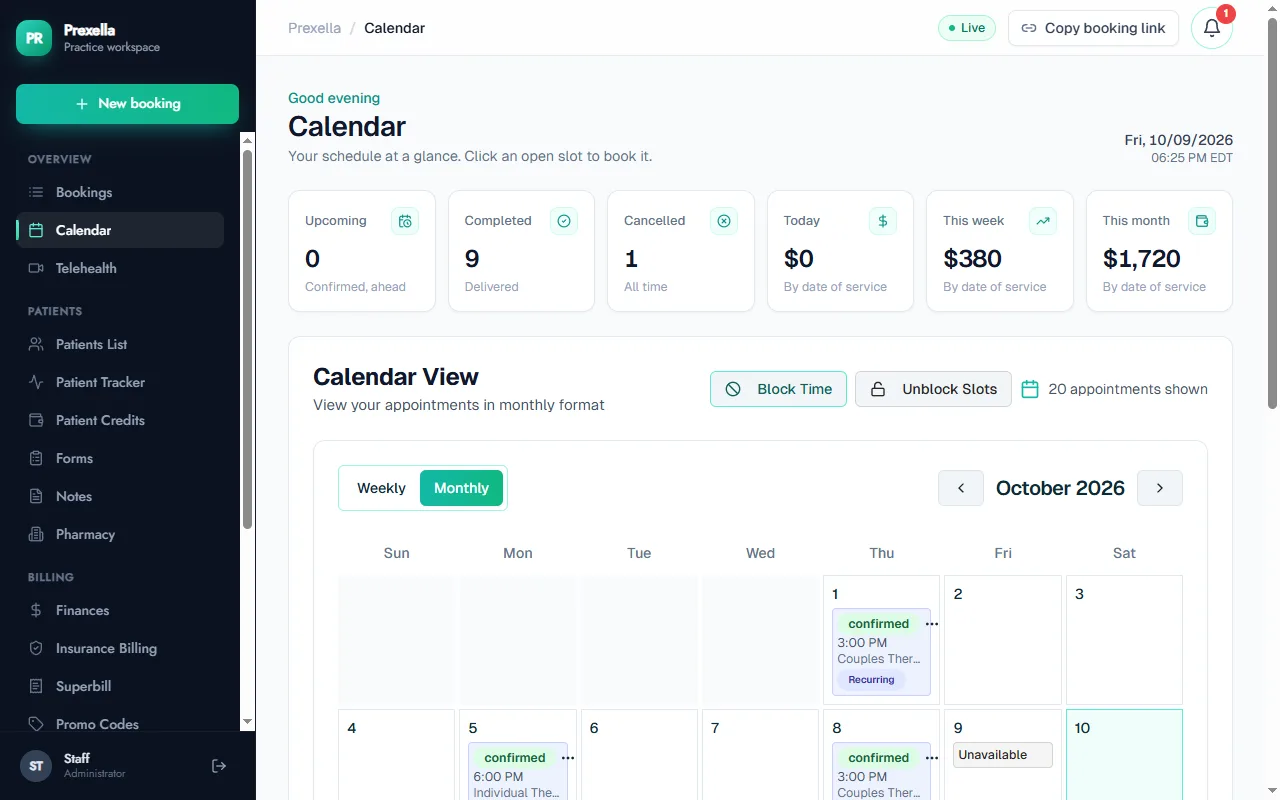
That is the difference between a scheduling app for business in general and software built for a practice: the general tool books the time; the practice tool also gets the client to it.
A sample late-cancellation policy
Adapt this wording with your own window and fee, and have it reviewed for your state and any payer contracts:
Sessions cancelled or rescheduled with less than 48 hours' notice, and missed sessions, are charged at the full session fee. Exceptions may be made for emergencies and sudden illness at the therapist's discretion. Insurance does not reimburse missed sessions, and they will not appear on a superbill.
Repeat the window in every booking confirmation and reminder, so the client sees it at the moment they might cancel.
Telehealth no-shows
Telehealth removes the commute but adds its own failure points: the wrong link, a laptop that needs an update, a client who forgot the session was video. Three habits help:
- Put the join link in the confirmation and the reminder, not only in the calendar invite.
- Ask new telehealth clients to test their camera and audio before session one.
- Have a fallback, such as a phone number you will call if the client has not joined five minutes after start.
What a no-show costs
A practice charging $160 a session that loses three sessions a week to no-shows and late cancellations loses $480 a week. Over 46 working weeks, that is $22,080 a year, before counting the clinical cost of interrupted treatment. Cutting that by half with reminders and payment at booking pays for most practice software many times over. The figures are illustrative; plug in your own fee and no-show count.
Step by step: setting up a no-show system in one afternoon
- Write your policy. Window (24 or 48 hours), fee, exceptions. Add it to your informed consent.
- Turn on reminders. One email the day before every session, including date, time, time zone, visit type and the telehealth link.
- Require payment at booking for new clients, and offer prepaid packages to ongoing clients.
- Move ongoing clients to recurring slots so they keep the same time each week.
- Allow self-service rescheduling within your notice window, so a conflict becomes a reschedule.
- Add the policy to your confirmations so clients see it when they book.
- Start a simple log of no-shows and late cancellations to review monthly.
Common mistakes
- Applying the policy inconsistently. Waiving the fee for some clients and not others creates resentment and makes the policy meaningless. Decide your exceptions in advance.
- Reminders without the link. For telehealth, a reminder without the join link sends the client searching at the worst moment.
- Charging without consent. A fee the client did not agree to in writing invites disputes.
- Treating every no-show as an admin issue. Repeated misses can be clinically meaningful and deserve a conversation.
- Billing missed sessions to insurance. A missed session is not a service and does not go on a claim or superbill.
Waitlists and filling cancelled slots
A late cancellation hurts less if the slot can be filled. Keep a short list of clients who want an earlier or extra session, and offer the freed slot as soon as a cancellation comes in. With online booking, a cancelled slot reopens on your booking page automatically, so a new or existing client can take it without a phone call. Over a year, filling even one cancelled slot a week recovers a meaningful share of the cost of no-shows.
Track the right numbers
Two rates tell you most of what you need: the no-show rate (sessions missed without notice ÷ sessions booked) and the late-cancellation rate (sessions cancelled inside your window ÷ sessions booked). Track them separately. A rising no-show rate usually points to reminders or engagement; a rising late-cancellation rate usually points to scheduling, such as times that do not fit clients' lives. Look at both by day of week and by time of day, and look at new clients separately from ongoing ones, because the first three sessions are where most drop-off happens in many practices.
Measure it
Track no-shows and late cancellations each month, as a share of booked sessions. If the number rises, look at which clients and which time slots. A pattern by time of day may point to a scheduling problem; a pattern by client usually points to a clinical conversation.
See how Prexella handles reminders, payment and recurring sessions for therapists and psychologists, or request a demo.
Run your practice from one screen
Booking, superbills, the client portal and marketing on your own domain. See it in a free, one-on-one demo.