

What Is Practice Management Software? A Buyer's Guide
Practice management software is the system that runs the business side of a clinical practice. Here is what it covers, how it differs from the tools it replaces, and how to choose one without a spreadsheet of 40 vendors.
Practice management software is the system that runs the business side of a clinical practice: scheduling, client records, forms, payments, billing documents and communication, all in one place. It is different from an EHR, which focuses on clinical notes, and from general business management software, which is not built for clinical work.
What practice management software does
Most practice management software covers six jobs:
- Scheduling. Appointment scheduling software for staff and online booking software for clients, with recurring sessions and protection against double bookings.
- Client records. Client management software that keeps contact details, sessions, forms, payments and messages on one record.
- Intake and consent. Forms sent automatically and signed electronically before the first session.
- Payments. Card payment at booking, packages, receipts and balances.
- Billing documents. Superbills for out-of-network clients, claims for in-network ones.
- Communication. Reminders, confirmations and secure messaging.
Many systems add a client portal, telehealth scheduling, reporting and marketing tools.
How it differs from an EHR
An electronic health record is about clinical documentation: progress notes, diagnoses, treatment plans and outcomes. Practice management software is about operations. In large health systems these are often separate products from separate vendors. For small practices, most products combine them, and the question is which side the product is strongest on.
| Practice management software | EHR | |
|---|---|---|
| Main job | Running the practice | Documenting care |
| Core records | Appointments, payments, forms | Notes, diagnoses, treatment plans |
| Typical users | Owner, front desk, biller | Clinicians |
| Key outputs | Bookings, receipts, superbills, claims | Progress notes, assessments |
| Where it shines | Fewer admin hours | Better documentation |
See it with your own practice
Prexella runs booking, superbills, the client portal and marketing in one system on your own domain. A live demo takes 30 minutes.
How it differs from business management software
Business management software, including the small business management software sold to retailers and agencies, covers accounting, inventory, CRM and project tracking. It can run a lot of a practice's back office, but it does not know what a consent form, a CPT code or a recurring weekly client is. Practice management software is business software built for clinical work.
Types by specialty
The market splits by who the software is built for:
- Medical practice management software and doctor practice management software for physician offices: insurance claims, eligibility checks, lab orders and multi-provider scheduling.
- Healthcare practice management software for broader outpatient care such as physical therapy, chiropractic and multi-discipline clinics.
- Therapy and counseling practice management software for mental health: time-based psychotherapy codes, consent forms, measurement-based care and superbills.
- Coaching and wellness platforms for programs, packages and courses.
Choosing within the right category matters more than choosing the "best" product overall. A medical system can run a therapy practice, but it will be heavy where you need it light and light where you need it heavy.
Signs your practice has outgrown separate tools
You probably need practice management software if:
- New clients are booked by email or phone back-and-forth
- Intake forms are PDFs that clients print, sign and scan
- You chase unpaid sessions at the end of the month
- Superbills are built by hand in a document template
- Reminders are texts you send from your own phone
- A client's information lives in four different places
- You spend more than an hour a week on admin you do not bill for
Demand is rising, which makes the admin load heavier. The US Bureau of Labor Statistics projects employment of substance abuse, behavioral disorder and mental health counselors to grow 17% from 2024 to 2034, much faster than average (BLS Occupational Outlook Handbook, checked 10/10/2026), and in the American Psychological Association's 2023 survey, 56% of psychologists said they had no openings for new patients (APA, December 2023).
Must-have features
Scheduling that protects your calendar
Look for appointment management software that handles reschedules, cancellations and recurring slots, and client scheduling software that lets clients book online on your website. The slot should be re-checked at the moment of booking, so two clients cannot take the same time. See Prexella's online booking for an example of the flow.
Payments at booking
Card payment when the client books, and prepaid packages for ongoing clients.
Forms with e-signatures
Intake, informed consent and telehealth consent completed and signed electronically, with an audit trail.
Billing documents
For private-pay practices, one-click superbills with NPI, EIN, ICD-10, CPT and place of service. For in-network practices, claims.
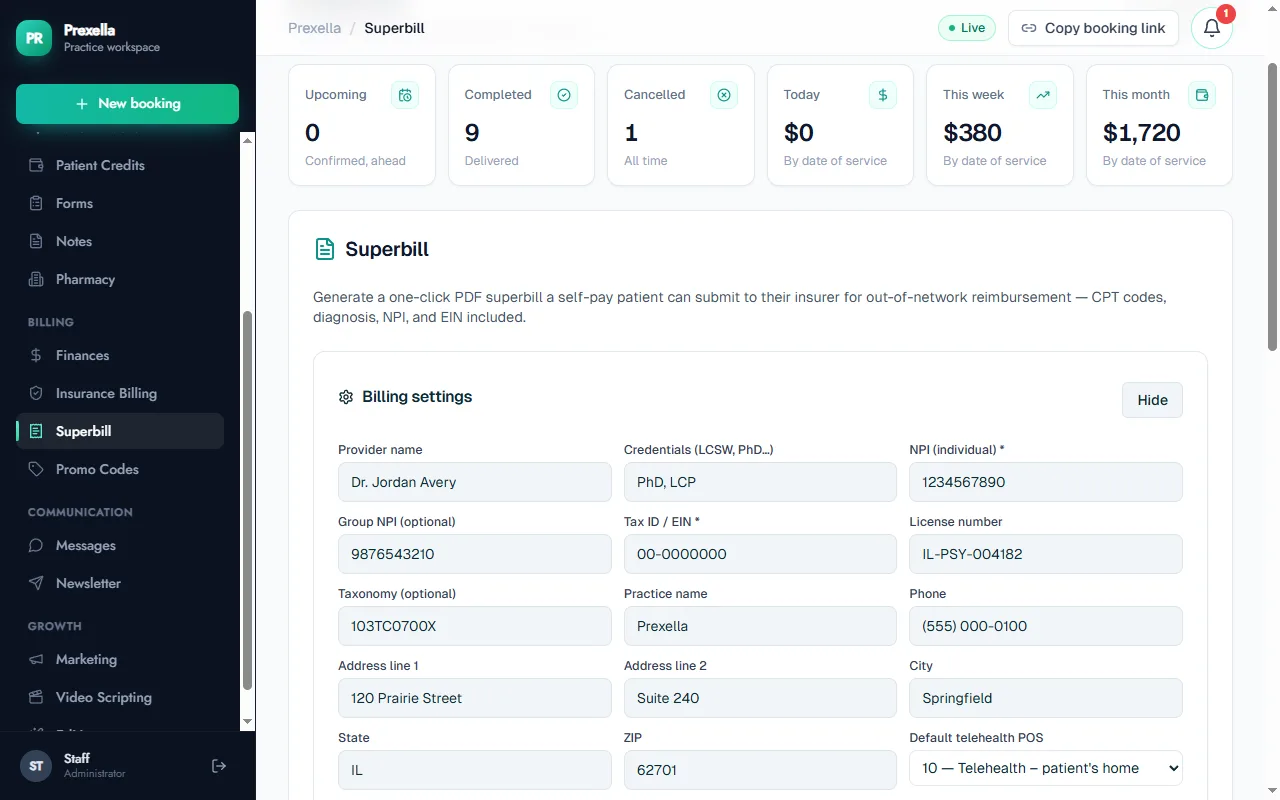
In Prexella, provider details such as NPI, EIN, license number and taxonomy code are stored once in billing settings and applied to every superbill, which is generated from a client's completed sessions.
Security and a Business Associate Agreement
The software will store protected health information. HHS treats a cloud service that stores electronic protected health information on a practice's behalf as a business associate that must sign a Business Associate Agreement (HHS guidance on HIPAA and cloud computing). Ask every vendor for theirs.
Pricing models
Three models dominate:
| Model | How it works | Good for | Watch out for |
|---|---|---|---|
| Per clinician | A base price plus a fee for each additional clinician | Solo practices | Cost grows with every hire |
| Usage-based | Price rises with sessions or clients | Small caseloads | Unpredictable bills |
| Flat practice fee | One price for the whole practice | Growing group practices | Check what is included |
Add-ons matter as much as the base price: AI notes, premium video, text reminders, e-prescribing, website builders and per-claim fees can double a bill. Ask for the total with everything you would actually use, for your headcount next year.
How to choose in five steps
- Write down how you are paid. Insurance, private pay or both.
- List your must-haves. Use the feature list above and cross off what you will not use.
- Shortlist three vendors in the right category.
- Run the same demo script with each. Book a new client, take payment, send forms, produce a superbill or claim, using your real session types.
- Compare total cost for next year's headcount, including add-ons.
The first 30 days with new software
A practical rollout:
- Week 1: set up. Services and fees, availability, forms, payment processing, reminders and branding. Book a test client end to end.
- Week 2: new clients only. Point new bookings at the new system. Existing clients stay where they are.
- Week 3: move existing clients. Invite them to the client portal, move recurring slots, collect updated consents.
- Week 4: close the loop. Generate the month's superbills or claims from the new system, check the income report, and cancel the old tool once nothing is left in it.
Getting your data out later
Choose software as if you might leave it. Ask what you can export, in which formats, and whether exports are self-service, and keep a copy of anything the vendor cannot export. Records-retention rules for client records keep running after you cancel a subscription.
Support
Software that runs your practice will occasionally break at the worst time. Before buying, ask how to reach support, in which hours, through which channels, and whether phone support depends on your plan. A vendor who sets the system up with you on a call is easier to reach when something goes wrong later.
What it costs to keep separate tools
Before you compare software prices, put a number on what you use today. A typical private practice stack might include a scheduling tool, a forms service, a payment processor's monthly fee, a text reminder service, a document template for superbills, an email newsletter tool and a spreadsheet. Add up the monthly fees, then add the hours: copying new-client details between tools, sending forms by hand, chasing payments, building superbills, and answering "where is my link?" emails. Multiply those hours by what a session earns.
Most practices that do this exercise find the time cost is larger than the subscription cost. That is the real comparison: not one tool's price against another's, but your current total against one system that does the same work with less copying.
Common buying mistakes
- Comparing starting prices. Per-clinician fees, add-ons and per-claim or per-text charges change the ranking. Compare the full monthly cost for next year's headcount.
- Buying for features you will not use. A medical system with lab orders and e-prescribing is not better for a therapy practice that needs neither.
- Skipping the client's view. Book, pay and sign forms as a client on your own phone before you decide.
- Ignoring branding. If clients sign in to a vendor-branded portal, every interaction promotes the vendor. White-label systems put your practice name, domain and contact details there instead.
- Moving everything at once. Run new clients on the new system first; move existing clients over a few weeks.
- Not asking about exit. Find out how you will export your data before you need to.
Who should be involved in the decision
In a solo practice, you decide alone, but test the client side with a friend who is not a clinician. In a group practice, involve the people who will use the system every day: one clinician, whoever handles scheduling and billing, and the owner. Clinicians care about the session record and screenings; the scheduler cares about the calendar and reschedules; the owner cares about cost, reporting and branding. A system that only one of them liked in the demo will be resisted after launch.
A decision checklist
Score each finalist from 1 to 5 on the items that matter to you, and weight the top three double:
| Criterion | Weight | Vendor A | Vendor B | Vendor C |
|---|---|---|---|---|
| Fits how we are paid (insurance, private pay or both) | ||||
| Online booking with payment and double-booking protection | ||||
| Intake forms with e-signatures | ||||
| Superbills or claims | ||||
| Client portal on our own brand and domain | ||||
| Telehealth scheduling | ||||
| Total monthly cost next year, with add-ons | ||||
| Business Associate Agreement offered | ||||
| Setup help and support | ||||
| Data export |
Questions to ask on every demo
- Show me a new client booking, paying and signing intake forms, start to finish.
- What happens if two clients try to book the same slot at once?
- Generate a superbill (or a claim) for last month's sessions for one client.
- How are telehealth sessions recorded, and which place of service code is used?
- Where do clients sign in, and whose brand do they see?
- Will you sign a Business Associate Agreement?
- What will this cost per month with our headcount next year, including add-ons?
- How do we export our data if we leave?
Where Prexella fits
Prexella is practice management software for private-pay therapists, counselors, psychologists and coaches. It combines online booking with card checkout, prepaid session credits, one-click superbills, a client portal with e-signed forms and screenings, and a built-in marketing suite, all white-labeled on the practice's own domain, for one flat fee for the practice. It does not host video or offer AI notes. See how it works for therapists and for psychologists, or request a demo and bring your own demo script.
Run your practice from one screen
Booking, superbills, the client portal and marketing on your own domain. See it in a free, one-on-one demo.