

Patient Management Software for Outpatient Practices
Patient management software keeps one record per patient and ties scheduling, intake, the patient portal, payments and reminders to it, so an outpatient practice runs from one system instead of several. The right choice is the one that gets patients booked, paperwork-complete and paid before the visit, with as little front-desk work as possible.
This guide covers what patient management software includes, how patient scheduling and the patient portal fit together, what to ask about security, and a checklist for comparing tools.
What patient management software includes
Patient management software sits between the front desk and the clinician. It does not replace clinical judgment or, in most small practices, a full electronic health record. It handles the administrative life of a patient:
- Demographics and contact details, entered by the patient once.
- Appointments, from the first booking to recurring visits.
- Intake and consent forms, completed and signed before the visit.
- Insurance details or self-pay status, including card photos.
- Payments, prepaid balances and statements.
- Messages and reminders, so patients arrive on time and prepared.
- Billing paperwork, such as superbills for out-of-network reimbursement.
Each item is simple on its own. The value comes from linking them, so a booking creates the patient record, intake attaches to it, and billing documents are built from appointments that already happened.
Patient scheduling software: the core
Most patient contact starts with scheduling, which makes patient scheduling software the part you will use most. It should do four things well.
Real availability. Patients should only see times the provider actually has open, with blocked time and existing appointments respected.
Server-side confirmation. Two patients choosing the same slot within seconds of each other should not both get it. The check has to run on the server when the booking is submitted.
Visit types. Patients choose in office or telehealth, and the choice should follow the appointment through reminders and billing.
Recurring visits. Weekly or biweekly patients should keep a standing slot.
Prexella's patient appointment scheduling software checks every booking, including online, portal and staff-entered bookings, against the calendar and refuses past dates on all of them. Patients choose telehealth or in office at booking. The online booking page shows the full flow.
See it with your own practice
Prexella runs booking, superbills, the client portal and marketing in one system on your own domain. A live demo takes 30 minutes.
The patient portal
Patient portal software moves work from the front desk to the patient, which most patients prefer. A good portal lets patients:
- Complete intake and sign consents before the first visit.
- See upcoming and past appointments, and book or reschedule.
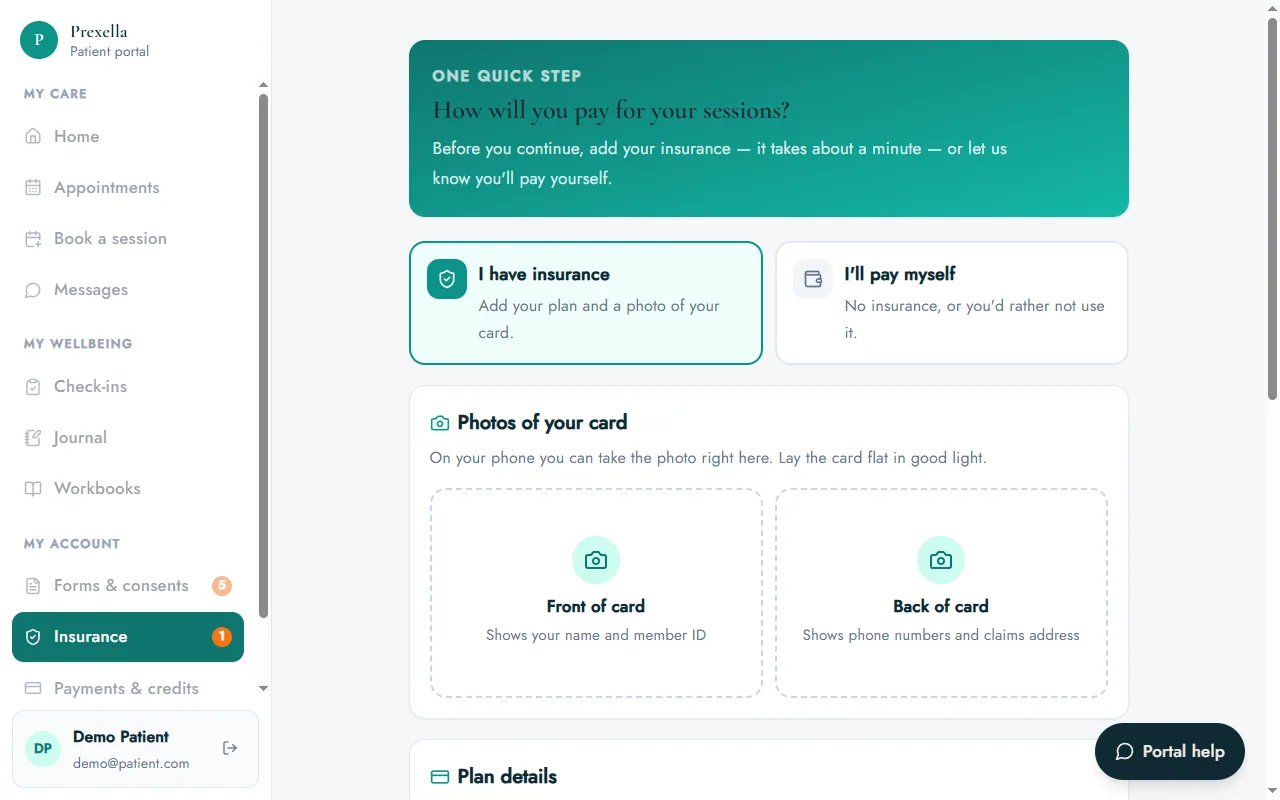
- Add insurance details and card photos, or choose to self-pay.
- Pay or buy prepaid sessions.
- Message the practice securely.
- Complete check-ins between visits.
In Prexella, the client portal works in any browser, so patients do not install an app. New patients are asked for insurance details or a self-pay choice before the rest of the portal opens, which keeps records complete before the first appointment.
Intake, consent and e-signatures
Paper intake costs time twice: once for the patient to fill it in, and again for staff to type it up. Electronic intake removes the second step. Patient management software should send forms automatically, require signatures, and keep an audit trail.
Prexella records the consent statement, typed name, drawn signature, timestamp, IP address and browser for every signed form, which supports the requirements of the federal ESIGN Act and state laws based on UETA.
Security questions to ask
Patient records are sensitive, and many practices are covered entities under HIPAA. Before you choose patient management software, ask each vendor:
- Will you sign a business associate agreement?
- Where are uploaded documents stored, and who can open them?
- How long do sessions stay signed in on a shared or lost device?
- Can staff see only what they need?
- How do I export my data if I leave?
The U.S. Department of Health and Human Services publishes guidance on business associates that explains when a software vendor needs a BAA. In Prexella, patient uploads live in private storage and are shown through signed links that expire after one hour, and portal sessions sign out after 10 minutes of inactivity.
Checklist: comparing options
| Capability | Must have | Nice to have |
|---|---|---|
| Online patient scheduling with server-side checks | ✓ | |
| In-office and telehealth visit types | ✓ | |
| Recurring appointments | ✓ | |
| Patient portal in a browser | ✓ | |
| E-signed intake and consent with audit trail | ✓ | |
| Insurance details and card photos, or self-pay | ✓ | |
| Card payment at booking | ✓ | |
| Prepaid packages or credits | ✓ | |
| Superbills for out-of-network patients | ✓ | |
| Insurance claims workflow | ✓ | |
| Your practice's own branding and domain | ✓ | |
| Built-in marketing | ✓ |
Adjust the columns for your practice. A cash-pay psychology practice might move superbills to "must have"; an in-network practice would move claims there.
Patient management for specific practice types
The right patient appointment software depends on how patients pay and how often they visit.
Psychology and therapy practices see patients weekly, rely on intake and consent, and often provide superbills. Psychological testing adds multi-hour evaluations billed in time units. See the psychologists page for how Prexella handles testing codes.
Nutrition practices run programs of initial and follow-up visits, often sold as packages, with medical nutrition therapy codes on superbills. See the dietitians page.
Medical practices that prescribe, order labs or chart clinically need doctor practice management software with an EHR attached. Prexella does not include e-prescribing, lab orders or medical charting.
Reminders and missed appointments
Missed appointments cost an outpatient practice twice: the lost fee and the slot another patient could have used. Patient management software reduces them in three ways.
Automatic reminders. A reminder before every appointment, with the time, location or video link, is the simplest and most effective tool. Prexella sends one the day before each appointment.
Payment at booking. Patients who have paid, or whose prepaid credits will be used, are less likely to miss the visit. In Prexella, a no-show or a cancellation within 48 hours costs one session credit under the practice's policy.
Easy rescheduling. Patients who cannot make it should be able to move the appointment in the portal rather than simply not showing up.
Payments and statements
The money side of patient management covers more than card processing. Patients need receipts, and those paying out of network need a superbill to claim reimbursement from their insurer. Practices need to see what each patient has paid, what they owe and how many prepaid sessions remain.
In Prexella, patients pay by card when they book or buy session credits in the portal. Staff see each patient's balance and payment history, and superbills are generated from completed sessions with CPT codes, ICD-10 diagnosis codes, the provider's NPI and EIN and the place of service.
The admin load is growing
Administrative work is a large and growing share of outpatient operations. The U.S. Bureau of Labor Statistics counted about 200,700 medical records specialist jobs in 2025 and projects 8% growth from 2025 to 2035 (BLS Occupational Outlook Handbook, accessed 10/10/2026). Small practices rarely have a records specialist at all, which is why self-service intake and a patient portal matter so much more for them.
How to roll out a new system
- Start with new patients. Send every new booking through the new system and let existing patients finish in the old one.
- Move forms first. Electronic intake shows its value in the first week.
- Turn on reminders. Automatic reminders before each appointment reduce no-shows without staff calls.
- Invite existing patients to the portal once their next appointment is booked in the new system.
- Retire the old system after one billing cycle, once final statements are out.
If you would like to see Prexella with your own appointment types and forms, request a demo.
Telehealth patients
Telehealth changes patient management in small ways that add up. The appointment must record that it is virtual, the reminder must carry the join link, and billing must use the right place-of-service code. Patients also need clear instructions the first time: how to join, what to do if the connection drops, and how to reach the practice.
In Prexella, the visit type is chosen at booking and stored on the appointment, telehealth patients get the join link by email, and the video runs in the practice's own HIPAA-ready video tool. Superbills use the practice's default telehealth place-of-service code for virtual sessions and code 11 for office visits.
Accessibility and ease of use
Patient management software only works if patients can use it. Check that the portal:
- Works on an older phone with a small screen.
- Uses plain language rather than system jargon.
- Lets patients reset their own password.
- Shows clear error messages when something is missing.
- Does not time out mid-form without warning.
Prexella's portal works in any browser, supports self-serve password reset, and warns patients before signing them out after 10 minutes of inactivity. Test any system with a patient who is not comfortable with technology; their experience is the real benchmark.
Communication preferences
Patients differ in how they want to hear from you. Some prefer email, some never open it. Patient management software should record contact details accurately, send confirmations and reminders automatically, and give patients a secure place, such as portal messages, for anything that should not travel by plain email. Ask whether reminders can be sent to a different email or phone than the patient's own, for example a parent's, and how the system handles patients who opt out.
Measuring the result
Three months after switching, compare three numbers with the period before: hours of front-desk time per week, the share of patients arriving with intake complete, and the no-show rate. If intake completion is not close to complete, check that forms go out automatically on booking. If no-shows have not fallen, check that reminders are reaching patients and that the cancellation policy is visible at booking.
A worked example: rolling out to a three-provider practice
Consider a three-provider outpatient practice seeing about 120 patients a week, moving from paper intake and a shared calendar to patient management software.
- Week 1: services, provider hours, forms and reminders are set up. All new bookings go online; new patients receive intake and consent by email on booking.
- Weeks 2–4: as each existing patient's next appointment is booked, they receive a portal invitation. By the end of week 4, most active patients have an account because nearly all of them had an appointment in that window.
- Week 5: the shared calendar is retired. Paper intake is used only for the occasional walk-in.
The front desk's biggest saving is in the first week, when new-patient paperwork stops being typed up by hand. The second saving arrives as reminders start reaching every patient automatically.
A common mistake: slow responses to record requests
Patient management software also makes it easier to meet obligations practices sometimes overlook. Under the HIPAA Privacy Rule, a covered entity generally must act on a patient's request to access their records within 30 days, with one 30-day extension allowed if the patient is told why (45 CFR 164.524). When signed forms and documents are already on the patient record, assembling them takes minutes rather than a search through filing cabinets.
Choosing between patient management tools
When two options score the same on the checklist, three tie-breakers usually settle it. First, the patient experience on a phone: book an appointment and complete intake yourself, as a patient would, and count the taps. Second, the price at next year's provider count, including add-ons such as text reminders and telehealth. Third, how easily you can leave: ask for a sample export before you sign. A vendor confident in its patient management software will show you all three without hesitation.
Small differences in daily usability compound over thousands of appointments, so weigh them more heavily than rarely used features.
Bottom line
Choose patient management software that builds everything on one patient record: scheduling with server-side checks, a browser-based portal, e-signed intake, payments and reminders. Decide early whether you need clinical charting, ask every vendor the five security questions, and favor the system your patients will find easiest to use on a phone.
Run your practice from one screen
Booking, superbills, the client portal and marketing on your own domain. See it in a free, one-on-one demo.