

CRM for Private Practice: Do You Need Customer Relationship Management Software?
Most private practices do not need separate customer relationship management software; they need practice software that already holds the client record, the booking history and the payments, plus a way to follow up. A general CRM makes sense mainly for practices with a long sales cycle, and it brings privacy obligations if any client health information goes into it.
Most private practices do not need separate customer relationship management software. What they need is practice software that already holds each client's bookings, payments and forms, with tools to follow up, and a simple place to track prospects before they book.
A general CRM earns its place when you have a long sales cycle, such as a coach selling programs to companies or a group practice running employer partnerships. For everyone else it is usually a second database to keep in sync, and a privacy question if client health information ends up in it.
What customer relationship management software does
A CRM (crm customer relationship management, if you search for it the long way) is a database of people and every interaction with them: calls, emails, meetings, deals and notes. Sales teams use a customer relationship management system to see who to follow up with and what stage each deal is at.
The core features of good CRM software are:
- Contacts and companies, with every email and call logged.
- Pipelines, showing each lead's stage, such as new, contacted, booked or lost.
- Tasks and reminders to follow up.
- Email campaigns and sequences, which is where customer communication management software overlaps with a CRM.
- Reporting on where leads come from and how many convert.
That is valuable when each customer is a deal worth chasing. It is less valuable when your "deal" is a person booking a 50-minute session from your website at 11 p.m. without speaking to anyone.
CRM vs practice management software
The confusion comes from vocabulary. Client management software, customer management software and customer relationship software all sound like the same thing. In practice there are two different tools:
| General CRM | Practice management software | |
|---|---|---|
| Main record | Contact or lead | Client with appointments |
| Tracks | Emails, calls, deals | Sessions, payments, forms, notes |
| Booking | Usually a link to another tool | Built in |
| Payments | Integrations | Built in, tied to sessions |
| Intake and consent forms | No | Yes |
| Superbills and claims | No | Often |
| Retention | Email sequences | Recurring slots, packages, reminders |
| Health information | Not designed for it unless stated | Designed for client records |
For a therapy, counseling or coaching practice, the client relationship lives in the appointments. A practice management system is effectively your client management system; the question is whether you also need a sales tool in front of it.
See it with your own practice
Prexella runs booking, superbills, the client portal and marketing in one system on your own domain. A live demo takes 30 minutes.
When a separate CRM makes sense
A dedicated customer relationship management system is worth it when:
- You sell to organizations. A coach running leadership programs for companies, or a practice building employee-assistance or school contracts, has a real sales pipeline with several contacts per deal.
- You have a long consideration period. Prospects who take weeks to decide, attend webinars or download guides benefit from a nurture sequence.
- Several people handle leads. An intake coordinator and two clinicians need a shared view of who has been called back.
In those cases, keep the CRM for prospects and organizations, and keep clients in your practice software. That split keeps sensitive information out of the sales tool.
The privacy question
If your practice is a HIPAA-covered entity, any vendor that stores or handles protected health information for you is generally a business associate and needs a business associate agreement (HHS: business associates). The fact that someone is your therapy client can itself be health information.
General-purpose CRMs differ on this. Some offer HIPAA-eligible plans with a BAA; many do not. HubSpot's CRM pricing page, for example, did not mention HIPAA or health data when we checked on 10/10/2026, so you would need to ask before storing client information there. The safe default: prospects in the CRM, clients in software built for client records.
Email follow-up has its own rules too. Marketing email must follow the CAN-SPAM Act: an accurate sender, a physical address and a working unsubscribe.
What a general CRM costs
Pricing verified on 10/10/2026.
| CRM | Free plan | Paid starting price | Pricing basis |
|---|---|---|---|
| HubSpot | $0 for up to 2 users | Starter from $7/mo per seat (promotional; $20 list) | Per seat |
HubSpot's free plan is a reasonable way to track prospects if you never put client health details into it. Costs rise with seats and with marketing features.
What practice software already covers
If you are weighing the best client management software against a general CRM, check how much of the CRM job your practice software already does. In Prexella:
- The client record. Every booking, payment, signed form, credit balance and message sits on one client record, so customer management tools are not scattered across apps.
- Where clients came from. The booking form asks how each new client heard about you, and the answer is saved with the booking and included in the new-booking email to your practice.
- Retention. Recurring weekly slots, prepaid session credits, automatic low-balance reminders three days before a session, and reminders before a package's final session do the job of customer retention management software for a practice.
- Communication. Secure messages in the client portal and branded client newsletters.
- Marketing results. The marketing suite lets you record and review Meta and Google ad results next to the calendar those ads are meant to fill.
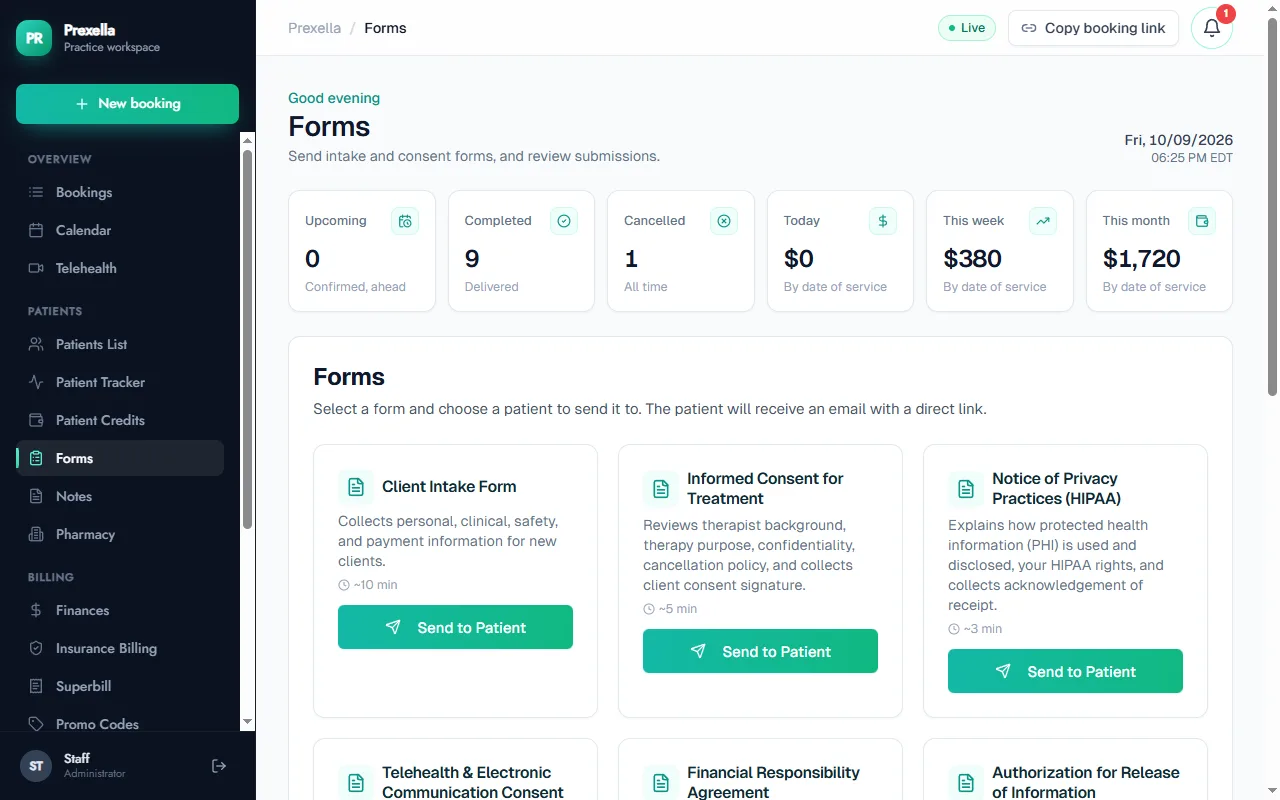
What it does not do is run a sales pipeline for organizations. If you sell to companies, pair it with a CRM for those deals.
Choosing: a checklist
Use this to decide whether you need customer relationship management software at all, and which kind:
- Do most clients book themselves online without a sales conversation? Practice software is probably enough.
- Do you sell to organizations or run multi-week sales conversations? Add a CRM for prospects.
- Will any client health information go into the CRM? Get a BAA first, or keep clients out of it.
- Does your practice software capture referral source? That covers most lead-source reporting.
- Can your practice software send newsletters and follow-ups? That covers most customer communication.
- Will two systems need syncing? Price the time, not just the subscription.
A lead pipeline without a CRM
For a practice where most clients book themselves, a lead pipeline can be four habits instead of a new system:
- Capture the source at booking. Ask how each new client heard about you, every time.
- Track inquiries that did not book. A short list of people who emailed or called but did not book, with the date and what they asked. Follow up once, briefly.
- Keep a waitlist. If you are full, a waitlist with permission to contact turns overflow into future clients.
- Review monthly. Compare bookings by source with what each source costs, and adjust.
That covers what a small practice needs from a customer management system without a second database. If the inquiry list grows past what one person can follow up, that is the signal to add a CRM for prospects.
Questions to ask a CRM vendor
If you do add a CRM, ask before you sign:
- Will you sign a business associate agreement, and on which plan?
- Can we restrict which users see which records?
- Where is data stored, and can we export everything if we leave?
- Does it connect to our booking tool, or will we copy data by hand?
- What does it cost for our users next year, including the marketing tier we would need?
A CRM that cannot answer the first question should only ever hold prospects, never clients.
Names you will see
Vendors use many names for overlapping products, and it helps to know which is which when you search. "Customer resource management software" and "customer resource management system" are usually misspellings of CRM. "Customer interaction management software" and "customer communication management software" tend to mean contact-center and messaging tools. "Customer retention management software" and a "customer retention management system" focus on churn and loyalty. "Business management software", "small business management software" and "business management process software" usually mean accounting, operations and sometimes software to manage finances. In salons, "spa and salon management software" or "best salon software" means booking plus point of sale.
For a small practice, the useful question is not what the category is called but where your client record lives. A customer management system for small business that also books, bills and follows up is usually the better buy than a CRM bolted onto a booking tool.
What changes as the practice grows
A solo practice and a ten-clinician group need different things from the same category of software.
Solo. One person handles every inquiry. A booking page that captures the referral source, a short inquiry list and a newsletter cover it. A CRM is overhead.
Small group, two to five clinicians. Inquiries now need routing: which clinician has openings, who specializes in what. An intake coordinator, even part time, benefits from a shared inquiry list. Practice software that shows every clinician's availability in one calendar handles most of the routing.
Larger group. Contracts with employers, schools or other organizations, a marketing budget across several channels, and staff who handle leads full time. This is where customer relationship management software earns its cost, still for prospects and organizations rather than clients.
At every size, the client record stays in the practice system. The only question is how much sales machinery sits in front of it.
The bottom line
A private practice rarely needs standalone customer relationship management software for its clients. Keep clients in practice software built for client records, with retention and communication built in, and add a CRM only for prospects and organizational sales, without client health information. If you want booking, payments, forms, follow-up and marketing results in one client record under your own brand, see Prexella in a free demo, or read how coaches use it on client management for coaches and how therapists use it on therapist practice management.
Run your practice from one screen
Booking, superbills, the client portal and marketing on your own domain. See it in a free, one-on-one demo.