

Clinic Management Software: The Features That Actually Matter
Clinic management software runs the operational side of an outpatient clinic: scheduling, client records, payments, forms, reminders and billing paperwork, in one system. The features that matter most are the ones that stop double-bookings, get paperwork done before the visit and get you paid without manual follow-up.
This guide explains what clinic management software covers, where it overlaps with an EHR, which features to prioritize for a small outpatient or private-pay clinic, and how to compare options.
What clinic management software covers
Most clinics need software for five jobs. Each one can be a separate tool, but the gains come when they share one record.
- Scheduling. Provider calendars, appointment types, online booking, rescheduling and blocked time.
- Records. Client or patient demographics, contact details, history and documents.
- Payments. Card payments at booking or checkout, packages, refunds and outstanding balances.
- Paperwork. Intake forms, consents and policies, signed electronically.
- Billing documents. Superbills for out-of-network reimbursement, and claims if the clinic bills insurance.
Larger medical clinics add clinical modules on top: charting, e-prescribing, lab orders and results. That is where the line between clinic management software and medical practice management software blurs. Many vendors sell both as one product, and many small clinics pay for clinical modules they never open.
Operations software vs an EHR
An electronic health record is built around clinical documentation. Healthcare practice management software is built around operations. For a cash-pay therapy, psychology or nutrition clinic, operations usually take more staff time than charting, so the scheduling, payments and forms side deserves the most weight in your evaluation.
Ask two questions to work out what you need:
- Do your providers prescribe or order labs? If yes, you need an EHR with those functions, and the clinic management side may come with it.
- Do most clients pay you directly? If yes, look closely at online booking with payment, prepaid packages and superbills, which many EHRs treat as an afterthought.
See it with your own practice
Prexella runs booking, superbills, the client portal and marketing in one system on your own domain. A live demo takes 30 minutes.
Scheduling: the feature you will use every hour
Clinic appointment scheduling software is where the work concentrates. A slow or unreliable calendar costs front-desk time and empty slots every day.
What good clinic scheduling software does
- Shows real availability. The slots a client can book online should be the same slots your providers have open, with blocked time respected.
- Confirms on the server. A clinic booking system should check the slot again when the booking is submitted, so two clients picking the same time a second apart cannot both get it.
- Blocks past dates everywhere. Online, at the front desk and on reschedule.
- Handles visit types. In person or telehealth, chosen at booking, with the right place-of-service code carried through to billing.
- Supports recurring appointments. Weekly clients should keep their slot without being rebooked each time.
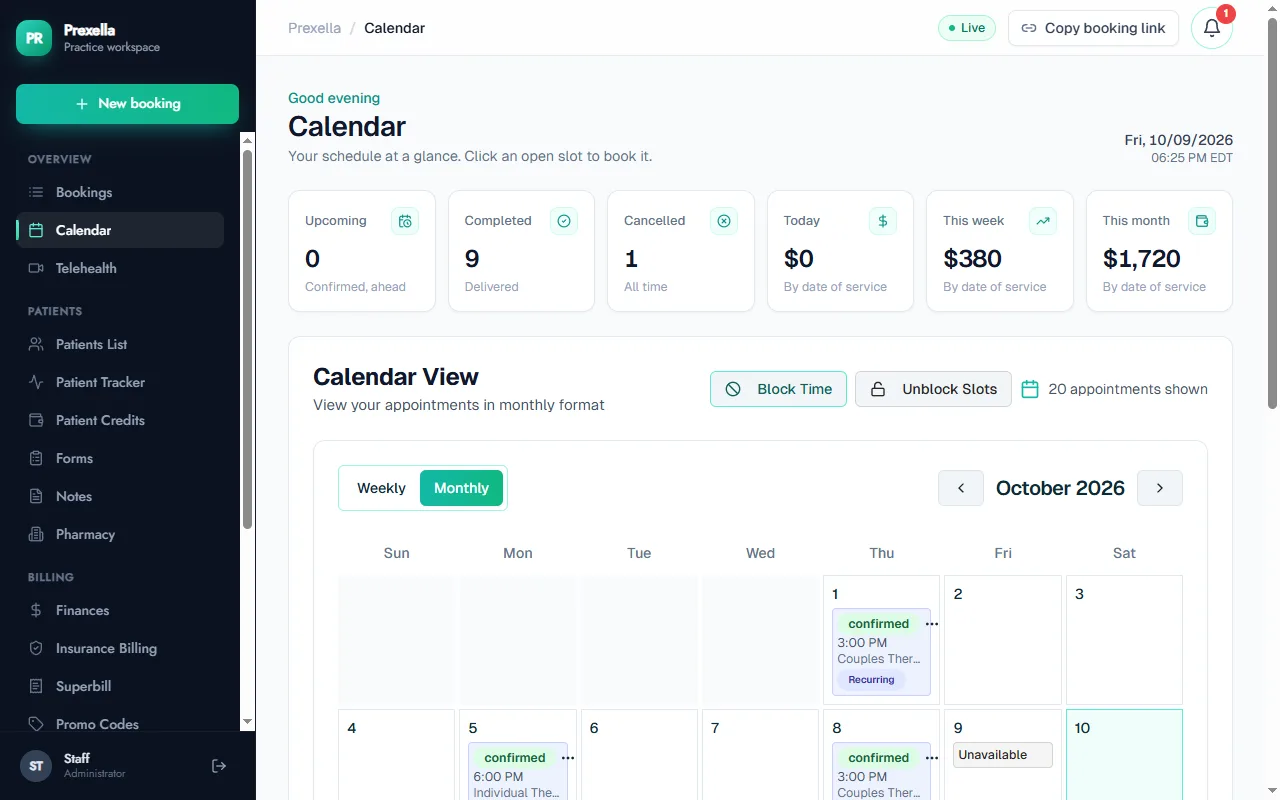
In Prexella, every booking path, including the public booking page, the client portal and manual bookings by staff, checks the slot and the date on the server before confirming. Clients choose telehealth or in office when they book, and recurring clients keep a weekly slot. The full flow is on the online booking page.
Telehealth in the same calendar
A clinic that offers video visits needs them in the same calendar as in-person visits, or providers end up double-booked across two systems. Prexella keeps both visit types in one calendar and emails telehealth clients the join link; the video itself runs in the clinic's own HIPAA-ready video tool. See telehealth scheduling for how the link is routed.
For billing, the visit type matters. The Centers for Medicare & Medicaid Services defines place of service code 10 for telehealth provided in the patient's home (effective January 1, 2022), code 02 for telehealth provided elsewhere, and code 11 for an office visit (CMS, accessed 10/10/2026).
Records, forms and the client portal
The second most time-consuming job in a clinic is paperwork. Clinic management software should send intake and consent forms automatically, collect signatures, and keep the signed copies on the client record.
A client portal turns that into self-service. Clients complete forms before their visit, update their details and see upcoming appointments without calling the front desk. In Prexella, the portal also holds insurance details or a self-pay choice, which every new client completes before reaching the rest of the portal.
Payments, packages and billing paperwork
For private-pay clinics, the payment side of a clinic appointment management system matters as much as the calendar:
- Card payment at booking reduces no-shows and unpaid visits.
- Packages and prepaid credits suit programs such as a series of nutrition consults or weekly therapy.
- Superbills let clients claim out-of-network reimbursement without the clinic joining insurance panels.
Prexella generates a superbill PDF from completed sessions with the provider's NPI, EIN, license number and taxonomy code, the diagnosis codes the provider enters, and CPT codes including psychotherapy, psychological testing (96130–96139) and medical nutrition therapy (97802–97804). The psychologists and dietitians pages show which codes apply to each.
A checklist for choosing a system
Score each option on your shortlist against this list.
| Requirement | Ask the vendor |
|---|---|
| Server-side slot checks | Can two people book the same slot at the same moment? |
| Online booking with payment | Can clients pay, or buy a package, when they book? |
| Telehealth and in-person in one calendar | Is the visit type recorded and carried to billing? |
| Recurring appointments | Can a weekly client keep a standing slot? |
| E-signed intake and consent | Is there an audit trail for each signature? |
| Client portal in a browser | Do clients need to install an app? |
| Superbills and claims | Which CPT codes and POS codes are supported? |
| Clinical modules | Do you need charting, e-prescribing or labs? |
| Pricing model | Does cost rise per provider or per location? |
| Business associate agreement | Will the vendor sign a BAA if you are a covered entity? |
| Branding | Can the booking page and portal use your clinic's name and domain? |
The U.S. Department of Health and Human Services explains when a software vendor is a business associate under HIPAA. Read it before signing with any vendor that will store client health information.
Doctor practice management software vs a private-pay clinic system
Doctor practice management software built for primary care or specialist medicine assumes insurance billing first: eligibility checks, claims, remittance and denials. A private-pay or out-of-network clinic runs the other way round: payment at booking, prepaid packages and superbills the client submits themselves.
If your clinic is mostly in-network medical care, choose a system built around claims. If your clients mostly pay you directly, a private-pay system will fit your week better. Mixed clinics should look for one that does both well enough, or pair a private-pay front end with a billing service.
Prexella sits on the private-pay side. It includes an insurance billing workspace that turns sessions into claims for an in-house or outsourced biller, who submits them through their own clearinghouse, but its strengths are booking, credits, superbills and the client portal.
Questions to ask in a demo
- Show me a new client booking online, paying, and signing intake on their phone.
- Show me what happens when two clients try to book the same time.
- Show me a superbill for a client with three sessions this month.
- Show me how a telehealth appointment differs from an in-person one, end to end.
- What does it cost with our number of providers, including add-ons?
If you want to see those answered in Prexella with your own services, request a demo.
Setting up a clinic scheduling system that holds up
Most scheduling problems come from setup, not software. Before you go live with any clinic scheduling system, decide these rules once and configure them, rather than handling them case by case at the front desk.
Appointment types. List every service with its length, price, provider and whether it can be telehealth. A clinic appointment booking system works best with a short, clear list; ten near-identical services confuse clients.
Buffers and blocked time. Add the time providers need between sessions for notes, and block lunch, meetings and admin time in advance. Clients should never be offered a slot a provider cannot keep.
Booking windows. Decide how far ahead clients can book and how late they can book for the same day. Too short a window loses bookings; too long a window fills the calendar with appointments that later cancel.
Cancellation rules. Write the policy once, show it at booking and apply it the same way every time.
New versus returning clients. New clients usually need a longer first appointment and intake forms. Many clinics offer only the intake appointment type to first-time bookers.
Clinic booking software that lets you encode these rules saves front-desk time every day. An online clinic appointment system without them simply moves phone calls to email.
Reports a clinic actually uses
Clinic appointment software produces plenty of reports. Four are worth checking weekly:
- Utilization: booked hours against available hours, per provider.
- No-shows and late cancellations, per provider and per appointment type.
- Revenue by date of service, so you can compare weeks fairly.
- New clients and where they came from, so marketing spend follows results.
Prexella's dashboard shows upcoming, completed and cancelled sessions alongside revenue today, this week and this month, and it saves how each client heard about the practice with their booking.
Mistakes clinics make when choosing
- Buying for the clinic you want to be in five years. Enterprise features you will not use for years add cost and setup time now.
- Judging the calendar from the staff side only. Book as a client, on a phone. That is where most bookings start.
- Ignoring per-provider pricing. A system that is cheap for two providers can double in cost at four.
- Skipping the export question. If you cannot get your data out easily, switching later will be painful.
- Letting one person decide. The front desk, a provider and whoever handles billing should all try the system before you sign.
Who this applies to
Everything above applies whether you call your business a clinic or a practice. Therapist practice management software and therapy practice management software are clinic management systems with features shaped for recurring sessions, consent and superbills. Medical clinic scheduling software adds the clinical side. Pick the one shaped like your week, and make sure the clinic appointment booking app or clinic booking system software you choose works in a phone browser, because that is where most clients will book.
Bottom line
Good clinic management software keeps scheduling, records, payments and paperwork on one record, checks every booking on the server, and fits how your clients pay. Decide first whether you need clinical modules, then weigh scheduling and payments most heavily, and price every option at the number of providers you will have next year.
Run your practice from one screen
Booking, superbills, the client portal and marketing on your own domain. See it in a free, one-on-one demo.