

Online Booking Software for Small Businesses and Practices
The best online booking software for a small business is the one that matches what you sell: simple meeting schedulers suit free consultations, while paid appointments with packages, forms and reminders need a fuller booking system. For practices that also need intake, a client portal and billing paperwork, booking should live inside practice software rather than beside it.
Below we compare four widely used tools and Prexella on price, payments, packages, branding and HIPAA readiness, with pricing verified on 10/10/2026, and explain how to choose.
What online booking software should do
Every online booking system for small business promises the same headline: clients book themselves, any time. The differences show up in the details.
- Real availability. The online appointment calendar should show only times you can actually take, across every calendar you use.
- No double bookings. The system should re-check the slot when the client submits, not just when the page loads.
- Payment at booking. Taking a card when the client books cuts no-shows and invoicing.
- Packages and memberships. Many businesses sell blocks of sessions, not single appointments.
- Reminders. Automatic email or text reminders before each appointment.
- Intake. Forms collected before the first visit, not on a clipboard.
- Branding. A booking page that looks like your business, ideally on your own website domain.
Not every business needs all of these. A consultant offering free discovery calls needs the first two. A massage therapist needs payment, reminders and intake. A therapy practice needs all seven plus privacy safeguards.
The tools compared
All prices below are the lowest listed price for each plan from each vendor's official pricing page. Pricing verified on 10/10/2026.
| Tool | Starting price | Priced per staff? | Payment at booking | Packages | BAA listed | Own domain |
|---|---|---|---|---|---|---|
| Calendly | Free; Standard $10/seat/mo (billed yearly) | Yes, per seat | Yes, Stripe and PayPal (Standard) | Not listed on their pricing page | Not listed on their pricing page | Not listed on their pricing page |
| Acuity Scheduling | $16/mo (annual) or $20/mo; 1 calendar | By calendars: 1, up to 6, up to 36 | Yes, Stripe, Square, PayPal, Venmo | Yes, Standard and up | Yes, Premium ($49/mo annual) | Not listed on their pricing page |
| Square Appointments | Free plan for solo professionals; paid plan prices were not readable in our fetch of their pricing page | Not listed on their pricing page | Yes, Square payments | Not listed on their pricing page | Not listed on their pricing page | Not listed on their pricing page |
| Google Calendar appointment schedules | Free for one booking page; more with Workspace Business Standard and up | Per Workspace user | Yes, Stripe, on eligible Workspace plans | Not listed | Not listed | Not listed |
| Prexella | Flat practice fee, quoted on a demo | No | Yes, card checkout | Yes, packages and session credits | Ask on the demo | Yes |
Calendly
Calendly is the default meeting scheduler for many small businesses. The free plan covers basic booking; Standard ($10 per seat per month, billed yearly) adds Stripe and PayPal payments and automated reminders, and Teams is $16 per seat per month. It is strong for sales calls, interviews and consultations. Its pricing page does not mention packages, HIPAA or a business associate agreement.
Choose Calendly if you mainly book meetings and calls and do not handle health information.
Acuity Scheduling
Acuity is built for appointment-based businesses. Every plan includes custom client forms and payments through Stripe, Square, PayPal or Venmo. Standard adds memberships and packages for up to six calendars, and Premium lists "Sign BAA for HIPAA compliance" for up to 36 calendars.
Choose Acuity if you want a flexible appointment booking software with intake forms and packages, and a BAA option on the top plan.
Square Appointments
Square Appointments pairs booking with Square's card processing and point of sale. There is a free plan aimed at solo professionals and paid plans for growing teams and larger salons. When we fetched the pricing page on 10/10/2026, the plan prices did not load in readable form, so check their page for current figures.
Choose Square if you already take payments with Square in person and want booking in the same account.
Google Calendar appointment schedules
Google Calendar can publish a booking page for one appointment type at no cost. Workspace Business Standard and higher plans add multiple booking pages, Stripe payments at booking, automated email reminders and conflict checks across calendars. Google does not list plan prices on that page.
Choose Google Calendar if your business already runs on Google Workspace and your booking needs are simple.
Prexella
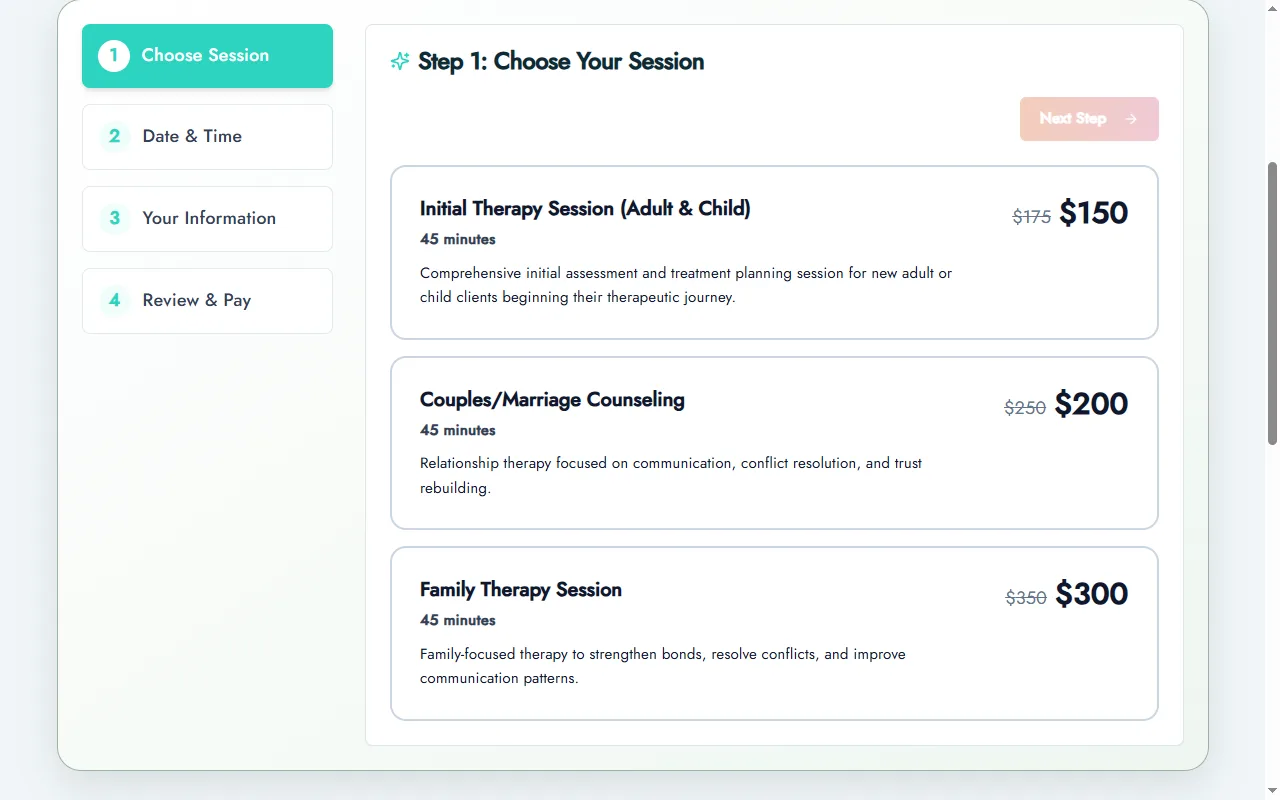
Prexella is practice management software for therapists, counselors and coaches with online booking built in. Clients choose a session, pick telehealth or in office, take an open slot and pay by card, then go straight into a client portal to sign intake forms. Packages book a series of weekly dates in one checkout, and promo codes work at booking. Every booking is checked on the server before it is confirmed, and past dates are blocked everywhere.
Choose Prexella if you run a private practice and want booking, payments, forms, credits and a branded client portal on your own domain in one system.
See it with your own practice
Prexella runs booking, superbills, the client portal and marketing in one system on your own domain. A live demo takes 30 minutes.
Booking needs by type of business
Consultants and coaches
Free discovery calls and paid sessions are the core. Most online scheduling programs with payments and reminders cover it. Coaches who sell packages need a system that tracks how many sessions are left. See how coaches use Prexella on the life coaches page.
Massage therapists and bodywork
The best online booking system for massage therapist businesses takes a card at booking, sends reminders, and collects an intake form before the first visit. Massage booking software should also handle different session lengths and buffer time between appointments. Acuity and Square are common choices here; dedicated massage software adds SOAP notes.
Salons and beauty businesses
An online booking system for salons has to model stylists, service lengths and processing time. A beauty salon booking system or salon reservation system usually adds deposits, rebooking and retail. Most salons are better served by a dedicated salon booking app than by a general appointment tool; our salon and spa software comparison on this blog covers the main options.
Gyms, studios and classes
Class booking software and gym booking software solve a different problem: many people in one time slot, capacity limits and memberships. Appointment tools built for one-to-one sessions, including Prexella, are not designed for group classes.
Therapy and counseling practices
A therapy practice needs everything above plus intake and consent, a client portal and, often, superbills. A general booking tool plus separate forms, payments and billing tools becomes five subscriptions. Practice software with booking built in, such as Prexella, replaces them. See therapists.
How to choose: a short checklist
- List what you sell: free calls, single paid sessions, packages, classes.
- Count your calendars next year, not today. Per-seat pricing grows with staff.
- Decide on payments: at booking, at the appointment or invoiced.
- Decide on intake: none, a short form, or signed consent.
- Check privacy needs: if you are a HIPAA-covered provider, require a BAA.
- Check branding: an embedded widget, or the full booking experience on your own website booking system.
- Test on a phone as a client would, from search to confirmation.
The U.S. Department of Health and Human Services explains when a vendor is a business associate, which is the deciding question for healthcare providers choosing a booking system.
Setting up online booking in a weekend
Whichever booking platform you choose, the setup follows the same order. Doing it in this order avoids the most common problems.
- Write your service list. Name, length, price and who provides it. Keep it short; clients abandon long lists.
- Set your hours and buffers. Add the gap you need between appointments, and block time you do not want booked.
- Connect your calendars. Any personal calendar you use should block booking slots, or clients will book over your dentist appointment.
- Turn on payment. Decide whether clients pay in full, pay a deposit or just leave a card. Payment at booking is the single biggest lever on no-shows.
- Write the policies. Cancellation window, late arrival, refunds. Show them at booking, not after.
- Add intake. A short form for new clients only, sent automatically.
- Turn on reminders. One the day before is the minimum.
- Put the booking link everywhere. Website header, Google Business Profile, email signature, social bios.
- Book yourself. On your phone, as a new client, from search to confirmation. Fix whatever annoys you.
A business online booking system that is set up well quietly fills the calendar. One that is set up in a hurry produces cancellations and support emails.
Common mistakes
- Too many services. Ten variations of the same appointment make clients call to ask which to pick.
- No buffer time. Back-to-back appointments with no gap guarantee running late by mid-afternoon.
- Policies hidden in an email. If the cancellation rule only appears after booking, enforcing it feels unfair.
- Calendars not connected. The online booking tool cannot block times it does not know about.
- A booking page that does not match your website. Clients hesitate when the brand changes at the moment they commit.
Online booking programs differ more in how well they prevent these mistakes than in their feature lists. When you trial one, deliberately try to break it: double-book, book in the past, book outside your hours. A good online appointment scheduling platform refuses all three.
What "best" means for a small business
The best online booking system for small business owners is rarely the one with the most features. It is the one that matches how you sell. A booking system for business consultants needs calendar sync and payment. A booking system app for a mobile service needs a phone-first view of the day. Customer appointment scheduling software for a clinic needs intake and reminders. Write down your top three jobs, then test each online booking appointment software against those three on a phone, as a client would.
Appointment software for small business owners also has to be easy to run alone. If changing your hours, adding a service or refunding a booking takes more than a minute, you will avoid doing it, and the online appointment booking system will drift out of date. Check the admin side as carefully as the client side, including the appointment calendar software view you will look at every morning. A good online appointment calendar software view shows the day, the week and open gaps at a glance, and an online appointment scheduling program should let you block an afternoon in two clicks.
Reading the fine print on pricing
Online booking prices look simple until you add the extras. Before you commit, total these for your business:
- Per-seat or per-calendar fees for every staff member who takes bookings.
- Payment processing on each transaction, which can cost more each month than the subscription.
- Text reminders, which some tools charge per message.
- Add-ons for intake forms, packages, websites or marketing.
- Annual versus monthly billing. Several tools show the annual rate by default; the monthly rate is higher.
Calendly and Acuity both display discounted annual rates on their pricing pages, so compare like with like. A best appointment scheduling software choice on paper can become the most expensive one at your real staff count.
Why branding matters more than it seems
When clients book through a vendor-branded page, the vendor's name sits between you and the client at the moment they commit. White-label booking keeps your business name and domain on every step. In Prexella, white-label means booking, the client portal and every confirmation and reminder email carry your practice's name, website domain, contact details and email sender address, so a client never sees "Powered by" anything.
For a small business building a local reputation, that consistency is part of the service. It also means your booking link is your website, which helps search engines associate bookings with your brand.
Bottom line
For simple meetings, a free or low-cost scheduler is enough. For paid appointments with packages and intake, choose a fuller booking system and check per-staff pricing. For private practices that also need a client portal, credits and billing paperwork, booking belongs inside practice software. Compare the table above against your own list, then see how Prexella's online booking works with your services in a free demo.
Run your practice from one screen
Booking, superbills, the client portal and marketing on your own domain. See it in a free, one-on-one demo.